Dropdown
A dropdown control that allows users to select a single option from a list of options.
Example:
ft.Dropdown(
    width=220,
    value="alice",
    options=[
        ft.DropdownOption(key="alice", text="Alice"),
        ft.DropdownOption(key="bob", text="Bob"),
    ],
)

Inherits: LayoutControl
Properties
autofocus- Whether the control will be selected as the initial focus.bgcolor- The background color of the dropdown menu in various ControlState states.border- Border around input.border_color- Border color.border_radius- The border radius applied to the corners of the dropdown input field.border_width- The width of the border in virtual pixels.capitalization- Configures how the text input should be capitalized.color- Text color.content_padding- The padding for the input decoration's container.dense- Whether the TextField is part of a dense form (i.e., uses less vertical space).editable- Whether the dropdown allows editing of the text input field.elevation- The dropdown's menu elevation in various ControlState states.enable_filter- Determine if the menu list can be filtered by the text input.enable_search- Determine if the first item that matches the text input can be highlighted.error_style- The TextStyle to use for error_text.error_text- Text that appears below the input border.expanded_insets- The insets for the expanded dropdown menu.fill_color- Background color of the dropdown input text field.filled- Whether the decoration's container is filled with theme fill_color.focused_border_color- Border color in focused state.focused_border_width- Border width in focused state.helper_style- The TextStyle to use for helper_text.helper_text- Text that provides context about the input's value, such as how the value will be used.hint_style- The TextStyle to use for hint_text.hint_text- Text that suggests what sort of input the field accepts.hover_color- The color of the dropdown input text field when hovered.input_filter- A filter to apply to the text input field.label- Optional text that describes the input field.label_style- The label's text style.leading_icon- An optional Icon at the front of the text input field inside the decoration box.menu_height- The height of the dropdown menu.menu_style- The menu style that defines the visual attributes of the menu.menu_width- The width of the dropdown menu.options- A list of options to display in the dropdown.selected_suffix- A control to display after the selected item in the dropdown.selected_trailing_icon- An optional icon at the end of the text field to indicate that the text field is pressed.text- The text entered in the text field.text_align- The text align for the TextField of the Dropdown.text_size- Text size in virtual pixels.text_style- The TextStyle to use for text in input text field.trailing_icon- An icon to display at the end of the text field.value- The key of the dropdown options corresponding to the selected option.
Events
on_blur- Called when the control has lost focus.on_focus- Called when the control has received focus.on_select- Called when the selected item of this dropdown has changed.on_text_change- Called when the text input of this dropdown has changed.
Methods
focus- Requests focus for this control.
Examples
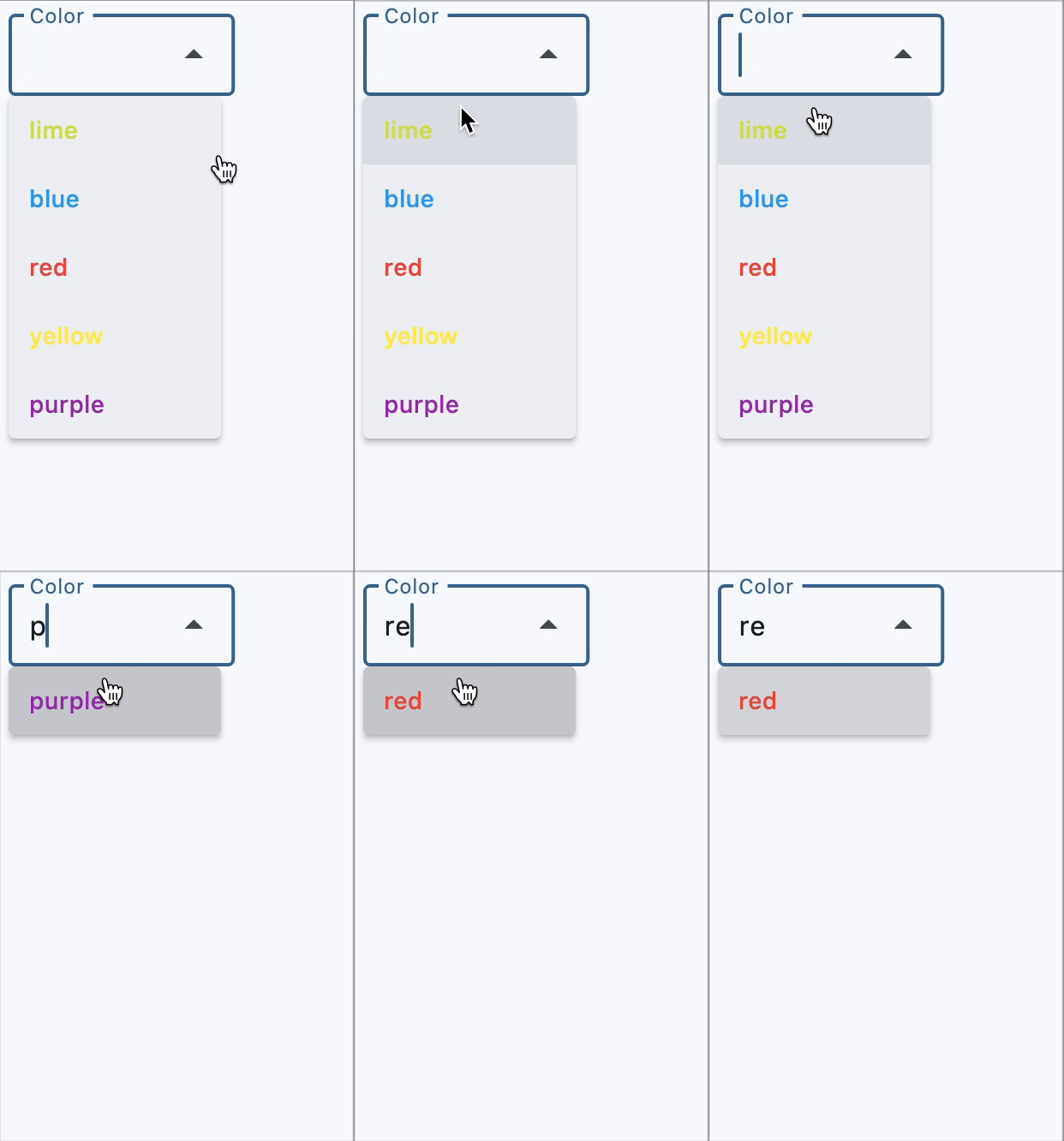
Color selection with filtering
import flet as ft


def main(page: ft.Page):
    page.theme_mode = ft.ThemeMode.LIGHT

    def get_options() -> list[ft.DropdownOption]:
        colors = [
            ft.Colors.RED,
            ft.Colors.BLUE,
            ft.Colors.YELLOW,
            ft.Colors.PURPLE,
            ft.Colors.LIME,
        ]
        return [
            ft.DropdownOption(
                key=color.value,
                content=ft.Text(value=color.value, color=color),
            )
            for color in colors
        ]

    def handle_dropdown_select(e: ft.Event[ft.Dropdown]):
        e.control.color = e.control.value

    page.add(
        ft.SafeArea(
            content=ft.Dropdown(
                editable=True,
                label="Color",
                options=get_options(),
                on_select=handle_dropdown_select,
            ),
        )
    )


if __name__ == "__main__":
    ft.run(main)
Icon selection
import flet as ft


def main(page: ft.Page):
    def get_options() -> list[ft.DropdownOption]:
        icons = [
            {"name": "Smile", "icon": ft.Icons.SENTIMENT_SATISFIED_OUTLINED},
            {"name": "Cloud", "icon": ft.Icons.CLOUD_OUTLINED},
            {"name": "Brush", "icon": ft.Icons.BRUSH_OUTLINED},
            {"name": "Heart", "icon": ft.Icons.FAVORITE},
        ]
        return [
            ft.DropdownOption(key=icon["name"], leading_icon=icon["icon"])
            for icon in icons
        ]

    page.add(
        ft.SafeArea(
            content=ft.Dropdown(
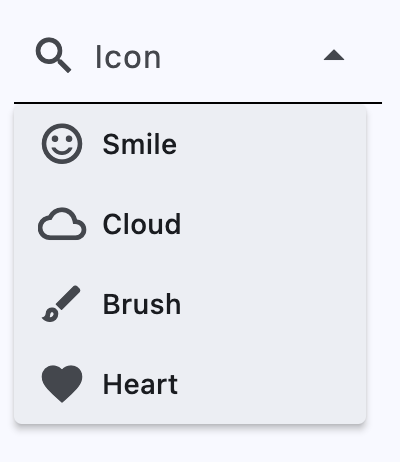
                border=ft.InputBorder.UNDERLINE,
                enable_filter=True,
                editable=True,
                leading_icon=ft.Icons.SEARCH,
                label="Icon",
                options=get_options(),
            ),
        )
    )


if __name__ == "__main__":
    ft.run(main)
Styled dropdowns
import flet as ft


def main(page: ft.Page):
    page.add(
        ft.SafeArea(
            content=ft.Column(
                controls=[
                    ft.Dropdown(
                        text_size=20,
                        content_padding=10,
                        color=ft.Colors.PURPLE_200,
                        bgcolor=ft.Colors.BLUE_200,
                        filled=True,
                        border_radius=30,
                        border_color=ft.Colors.GREEN_800,
                        focused_border_color=ft.Colors.GREEN_ACCENT_400,
                        focused_border_width=5,
                        options=[
                            ft.DropdownOption("a", "Item A"),
                            ft.DropdownOption("b", "Item B"),
                            ft.DropdownOption("c", "Item C"),
                        ],
                    ),
                    ft.Dropdown(
                        border_radius=30,
                        filled=True,
                        fill_color=ft.Colors.RED_400,
                        border_color=ft.Colors.TRANSPARENT,
                        bgcolor=ft.Colors.RED_200,
                        color=ft.Colors.CYAN_400,
                        focused_border_color=ft.Colors.PINK_300,
                        focused_border_width=20,
                        options=[
                            ft.DropdownOption("a", "Item A"),
                            ft.DropdownOption("b", "Item B"),
                            ft.DropdownOption("c", "Item C"),
                        ],
                    ),
                    ft.Dropdown(
                        border_color=ft.Colors.PINK_ACCENT,
                        focused_border_color=ft.Colors.GREEN_ACCENT_400,
                        focused_border_width=25,
                        border_radius=30,
                        width=150,
                        border_width=5,
                        options=[
                            ft.DropdownOption("a", "Item A"),
                            ft.DropdownOption("b", "Item B"),
                            ft.DropdownOption("c", "Item C"),
                        ],
                    ),
                    ft.Container(
                        padding=ft.Padding.only(bottom=20),
                        content=ft.Dropdown(
                            text_size=30,
                            color=ft.Colors.ORANGE_ACCENT,
                            border_radius=20,
                            filled=True,
                            border_width=0,
                            autofocus=True,
                            focused_border_color=ft.Colors.GREEN_100,
                            focused_border_width=10,
                            width=200,
                            height=50,
                            options=[
                                ft.dropdown.Option("a", "Item A"),
                                ft.dropdown.Option("b", "Item B"),
                                ft.dropdown.Option("c", "Item C"),
                            ],
                        ),
                    ),
                    ft.Dropdown(
                        text_size=30,
                        border_radius=20,
                        filled=True,
                        border_width=0,
                        focused_border_color=ft.Colors.GREEN_100,
                        focused_border_width=10,
                        content_padding=20,
                        width=200,
                        options=[
                            ft.DropdownOption(
                                key="a",
                                text="Item A",
                                style=ft.ButtonStyle(
                                    shape=ft.BeveledRectangleBorder(radius=15),
                                    color={
                                        ft.ControlState.HOVERED: ft.Colors.WHITE,
                                        ft.ControlState.FOCUSED: ft.Colors.BLUE,
                                        ft.ControlState.DEFAULT: ft.Colors.BLACK,
                                    },
                                ),
                            ),
                            ft.DropdownOption(
                                key="b",
                                text="Item B",
                                style=ft.ButtonStyle(
                                    shape=ft.BeveledRectangleBorder(radius=15),
                                    color={
                                        ft.ControlState.HOVERED: ft.Colors.WHITE,
                                        ft.ControlState.FOCUSED: ft.Colors.BLUE,
                                        ft.ControlState.DEFAULT: ft.Colors.BLACK,
                                    },
                                ),
                            ),
                            ft.DropdownOption(
                                key="c",
                                text="Item C",
                                style=ft.ButtonStyle(
                                    shape=ft.BeveledRectangleBorder(radius=15),
                                    color={
                                        ft.ControlState.HOVERED: ft.Colors.WHITE,
                                        ft.ControlState.FOCUSED: ft.Colors.BLUE,
                                        ft.ControlState.DEFAULT: ft.Colors.BLACK,
                                    },
                                ),
                            ),
                        ],
                    ),
                ],
            ),
        )
    )


if __name__ == "__main__":
    ft.run(main)
Properties
autofocusclass-attributeinstance-attribute
autofocus: bool = FalseWhether the control will be selected as the initial focus. If there is more than one control on a page with autofocus set, then the first one added to the page will get focus.
bgcolorclass-attributeinstance-attribute
bgcolor: Optional[ControlStateValue[ColorValue]] = NoneThe background color of the dropdown menu in various ControlState states.
borderclass-attributeinstance-attribute
border: Optional[InputBorder] = NoneBorder around input.
Defaults to InputBorder.OUTLINE.
border_colorclass-attributeinstance-attribute
border_color: Optional[ColorValue] = NoneBorder color.
Set to flet.Colors.TRANSPARENT to hide the border.
border_radiusclass-attributeinstance-attribute
border_radius: Optional[BorderRadiusValue] = NoneThe border radius applied to the corners of the dropdown input field.
Accepts a value in virtual pixels or a BorderRadiusValue object.
If set to None, the default border radius defined by the theme or system is used.
border_widthclass-attributeinstance-attribute
border_width: Number = 1The width of the border in virtual pixels.
Set to 0 to completely remove the border.
capitalizationclass-attributeinstance-attribute
capitalization: Optional[TextCapitalization] = NoneConfigures how the text input should be capitalized.
content_paddingclass-attributeinstance-attribute
content_padding: Optional[PaddingValue] = NoneThe padding for the input decoration's container.
denseclass-attributeinstance-attribute
dense: bool = FalseWhether the TextField is part of a dense form (i.e., uses less vertical space).
editableclass-attributeinstance-attribute
editable: bool = FalseWhether the dropdown allows editing of the text input field.
elevationclass-attributeinstance-attribute
elevation: Optional[ControlStateValue[Optional[Number]]] = 8The dropdown's menu elevation in various ControlState states.
enable_filterclass-attributeinstance-attribute
enable_filter: bool = FalseDetermine if the menu list can be filtered by the text input. Defaults to false.
If set to true, dropdown menu will show a filtered list. The filtered list will contain items that match the text provided by the input field, with a case-insensitive comparison.
enable_searchclass-attributeinstance-attribute
enable_search: bool = TrueDetermine if the first item that matches the text input can be highlighted.
error_styleclass-attributeinstance-attribute
error_style: Optional[TextStyle] = NoneThe TextStyle to use for error_text.
error_textclass-attributeinstance-attribute
error_text: Optional[str] = NoneText that appears below the input border.
If non-null, the border's color animates to red and the helper_text is not shown.
expanded_insetsclass-attributeinstance-attribute
expanded_insets: Optional[PaddingValue] = NoneThe insets for the expanded dropdown menu.
fill_colorclass-attributeinstance-attribute
fill_color: Optional[ColorValue] = NoneBackground color of the dropdown input text field.
Will not be visible if filled=False.
filledclass-attributeinstance-attribute
filled: bool = FalseWhether the decoration's container is filled with theme fill_color.
focused_border_colorclass-attributeinstance-attribute
focused_border_color: Optional[ColorValue] = NoneBorder color in focused state.
focused_border_widthclass-attributeinstance-attribute
focused_border_width: Optional[Number] = NoneBorder width in focused state.
helper_styleclass-attributeinstance-attribute
helper_style: Optional[TextStyle] = NoneThe TextStyle to use for helper_text.
helper_textclass-attributeinstance-attribute
helper_text: Optional[str] = NoneText that provides context about the input's value, such as how the value will be used.
If non-null, the text is displayed below the input decorator, in the same location
as error_text. If a non-null error_text value is specified then the helper text
is not shown.
hint_textclass-attributeinstance-attribute
hint_text: Optional[str] = NoneText that suggests what sort of input the field accepts.
Displayed on top of the input when it's empty and either (a) label is null or (b)
the input has the focus.
hover_colorclass-attributeinstance-attribute
hover_color: Optional[ColorValue] = NoneThe color of the dropdown input text field when hovered.
input_filterclass-attributeinstance-attribute
input_filter: Optional[InputFilter] = NoneA filter to apply to the text input field.
labelclass-attributeinstance-attribute
label: Optional[StrOrControl] = NoneOptional text that describes the input field.
When the input field is empty and unfocused, the label is displayed on top of the input field (i.e., at the same location on the screen where text may be entered in the input field). When the input field receives focus (or if the field is non-empty) the label moves above, either vertically adjacent to, or to the center of the input field.
label_styleclass-attributeinstance-attribute
label_style: Optional[TextStyle] = NoneThe label's text style.
leading_iconclass-attributeinstance-attribute
leading_icon: Optional[IconDataOrControl] = NoneAn optional Icon at the front of the text input field inside the decoration box.
If this is not null, the menu items will have extra paddings to be aligned with the text in the text field.
menu_heightclass-attributeinstance-attribute
menu_height: Optional[Number] = NoneThe height of the dropdown menu.
If this is None, the menu will display as many
items as possible on the screen.
menu_styleclass-attributeinstance-attribute
menu_style: Optional[MenuStyle] = NoneThe menu style that defines the visual attributes of the menu.
The default width of the menu is set to the width of the text field.
menu_widthclass-attributeinstance-attribute
menu_width: Optional[Number] = NoneThe width of the dropdown menu.
If this is None, the menu width will be the same as
input textfield width.
optionsclass-attributeinstance-attribute
options: list[DropdownOption] = field(default_factory=list)A list of options to display in the dropdown.
selected_suffixclass-attributeinstance-attribute
selected_suffix: Optional[Control] = NoneA control to display after the selected item in the dropdown.
selected_trailing_iconclass-attributeinstance-attribute
selected_trailing_icon: Optional[IconDataOrControl] = NoneAn optional icon at the end of the text field to indicate that the text field is pressed.
text_alignclass-attributeinstance-attribute
text_align: TextAlign = TextAlign.STARTtext_sizeclass-attributeinstance-attribute
text_size: Optional[Number] = NoneText size in virtual pixels.
text_styleclass-attributeinstance-attribute
text_style: Optional[TextStyle] = NoneThe TextStyle to use for text in input text field.
trailing_iconclass-attributeinstance-attribute
trailing_icon: Optional[IconDataOrControl] = NoneAn icon to display at the end of the text field.
Events
on_blurclass-attributeinstance-attribute
on_blur: Optional[ControlEventHandler[Dropdown]] = NoneCalled when the control has lost focus.
on_focusclass-attributeinstance-attribute
on_focus: Optional[ControlEventHandler[Dropdown]] = NoneCalled when the control has received focus.
on_selectclass-attributeinstance-attribute
on_select: Optional[ControlEventHandler[Dropdown]] = NoneCalled when the selected item of this dropdown has changed.
on_text_changeclass-attributeinstance-attribute
on_text_change: Optional[ControlEventHandler[Dropdown]] = NoneCalled when the text input of this dropdown has changed.