CupertinoCheckbox
A macOS style checkbox.
Checkbox allows to select one or more items from a group, or switch between two mutually exclusive options (checked or unchecked, on or off).
ft.Column(
    intrinsic_width=True,
    controls=[
        ft.CupertinoCheckbox(),
        ft.CupertinoCheckbox(label="Checked", value=True),
        ft.CupertinoCheckbox(label="Disabled", disabled=True),
    ],
)
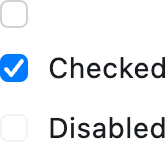
Inherits: LayoutControl
Properties
active_color- The color used to fill checkbox when it is checked/selected.autofocus- Whether this checkbox will be selected as the initial focus.border_side- Defines the checkbox's border sides in all or specific ControlState states.check_color- The color to use for the check icon when this checkbox is checked.fill_color- The color used to fill this checkbox in all or specific ControlState states.focus_color- The color used for this checkbox's border shadow when it has the input focus.label- A clickable label to display on the right of this checkbox.label_position- Defines on which side of this checkbox the label should be shown.mouse_cursor- The cursor for a mouse pointer entering or hovering over this checkbox.semantics_label- The semantic label for this checkbox that will be announced by screen readers.shape- The shape of this checkbox.spacing- The space between this checkbox and the label.tristate- IfTrue, this checkbox's value can beTrue,False, orNone.value- The value of this checkbox.
Events
Examples
Cupertino, Material and Adaptive Checkboxes
import flet as ft


def main(page: ft.Page):
    page.add(
        ft.SafeArea(
            content=ft.Column(
                controls=[
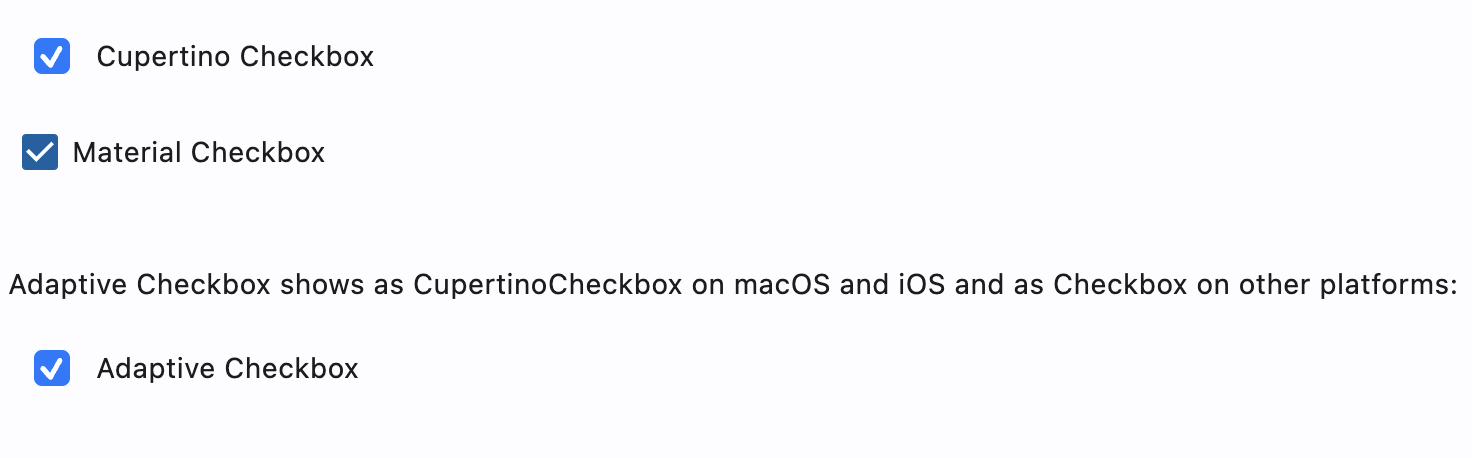
                    ft.CupertinoCheckbox(label="Cupertino Checkbox", value=True),
                    ft.Checkbox(label="Material Checkbox", value=True),
                    ft.Container(height=20),
                    ft.Text(
                        value=(
                            "Adaptive Checkbox shows as CupertinoCheckbox on macOS "
                            "and iOS and as Checkbox on other platforms:"
                        )
                    ),
                    ft.Checkbox(
                        adaptive=True,
                        label="Adaptive Checkbox",
                        value=True,
                    ),
                ],
            ),
        )
    )


if __name__ == "__main__":
    ft.run(main)
Styled checkboxes
import flet as ft


def main(page: ft.Page):
    page.theme_mode = ft.ThemeMode.LIGHT

    page.add(
        ft.SafeArea(
            content=ft.Column(
                controls=[
                    ft.CupertinoCheckbox(
                        label="Cupertino Checkbox tristate",
                        value=True,
                        tristate=True,
                        check_color=ft.Colors.GREY_900,
                        fill_color={
                            ft.ControlState.HOVERED: ft.Colors.PINK_200,
                            ft.ControlState.PRESSED: ft.Colors.LIME_ACCENT_200,
                            ft.ControlState.SELECTED: ft.Colors.DEEP_ORANGE_200,
                            ft.ControlState.DEFAULT: ft.Colors.TEAL_200,
                        },
                    ),
                    ft.CupertinoCheckbox(
                        label="Cupertino Checkbox circle border",
                        value=True,
                        shape=ft.CircleBorder(),
                    ),
                    ft.CupertinoCheckbox(
                        label="Cupertino Checkbox border states",
                        value=True,
                    ),
                    ft.CupertinoCheckbox(
                        label="Cupertino Checkbox label position",
                        value=True,
                        label_position=ft.LabelPosition.LEFT,
                    ),
                ],
            ),
        )
    )


if __name__ == "__main__":
    ft.run(main)
Properties
active_colorclass-attributeinstance-attribute
active_color: Optional[ColorValue] = CupertinoColors.ACTIVE_BLUEThe color used to fill checkbox when it is checked/selected.
If fill_color returns a non-null color in the flet.ControlState.SELECTED state, it will be used instead of this color.
autofocusclass-attributeinstance-attribute
autofocus: bool = FalseWhether this checkbox will be selected as the initial focus. If there is more than one control on a page with autofocus set, then the first one added to the page will get focus.
border_sideclass-attributeinstance-attribute
border_side: Optional[ControlStateValue[BorderSide]] = NoneDefines the checkbox's border sides in all or specific ControlState states.
check_colorclass-attributeinstance-attribute
check_color: Optional[ColorValue] = NoneThe color to use for the check icon when this checkbox is checked.
fill_colorclass-attributeinstance-attribute
fill_color: Optional[ControlStateValue[ColorValue]] = NoneThe color used to fill this checkbox in all or specific ControlState states.
active_color is used as fallback color when
the checkbox is in the SELECTED state,
flet.CupertinoColors.WHITE at 50% opacity is used as fallback color
when this checkbox is in the DISABLED state, and
flet.CupertinoColors.WHITE otherwise.
focus_colorclass-attributeinstance-attribute
focus_color: Optional[ColorValue] = NoneThe color used for this checkbox's border shadow when it has the input focus.
labelclass-attributeinstance-attribute
label: Optional[str] = NoneA clickable label to display on the right of this checkbox.
label_positionclass-attributeinstance-attribute
label_position: LabelPosition = LabelPosition.RIGHTDefines on which side of this checkbox the label should be shown.
mouse_cursorclass-attributeinstance-attribute
mouse_cursor: Optional[MouseCursor] = NoneThe cursor for a mouse pointer entering or hovering over this checkbox.
semantics_labelclass-attributeinstance-attribute
semantics_label: Optional[str] = NoneThe semantic label for this checkbox that will be announced by screen readers.
This is announced by assistive technologies (e.g TalkBack/VoiceOver) and not shown on the UI.
shapeclass-attributeinstance-attribute
shape: Optional[OutlinedBorder] = NoneThe shape of this checkbox.
Internally defaults to RoundedRectangleBorder(radius=4).
spacingclass-attributeinstance-attribute
spacing: Optional[Number] = 10The space between this checkbox and the label.
Events
on_blurclass-attributeinstance-attribute
on_blur: Optional[ControlEventHandler[CupertinoCheckbox]] = NoneCalled when this checkbox has lost focus.
on_changeclass-attributeinstance-attribute
on_change: Optional[ControlEventHandler[CupertinoCheckbox]] = NoneCalled when the state of this checkbox is changed.
on_focusclass-attributeinstance-attribute
on_focus: Optional[ControlEventHandler[CupertinoCheckbox]] = NoneCalled when this checkbox has received focus.