Slider
A slider provides a visual indication of adjustable content, as well as the current setting in the total range of content.
Use a slider when you want people to set defined values (such as volume or brightness), or when people would benefit from instant feedback on the effect of setting changes.
Example:
ft.Slider(label="Slider", value=0.3)

Inherits: LayoutControl, AdaptiveControl
Properties
active_color- The color to use for the portion of the slider track that is active.autofocus- True if the control will be selected as the initial focus.divisions- The number of discrete divisions.inactive_color- The color for the inactive portion of the slider track.interaction- The allowed way for the user to interact with this slider.label- A label to show above the slider when the slider is active.max- The maximum value the user can select.min- The minimum value the user can select.mouse_cursor- The cursor to be displayed when a mouse pointer enters or is hovering over this control.overlay_color- The highlight color that's typically used to indicate that the range slider thumb is in flet.ControlState.HOVERED or flet.ControlState.DRAGGED states.padding- Determines the padding around this slider.round- The number of decimals displayed on the label containing value.secondary_active_color- The color to use for the portion of the slider track between the thumb and the secondary_track_value.secondary_track_value- The secondary track value for this slider.thumb_color- The color of the thumb.value- The currently selected value for this slider.year_2023- If this is set toFalse, this slider will use the latest Material Design 3 appearance, which was introduced in December 2023.
Events
on_blur- Called when this slider has lost focus.on_change- Called when the state of this slider is changed.on_change_end- Called when the user is done selecting a new value for this slider.on_change_start- Called when the user starts selecting a new value for this slider.on_focus- Called when this slider has received focus.
Examples
Basic Example
import flet as ft


def main(page: ft.Page):
    page.add(
        ft.SafeArea(
            content=ft.Column(
                controls=[
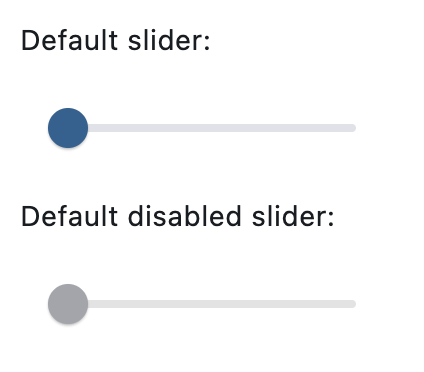
                    ft.Text("Default slider:"),
                    ft.Slider(),
                    ft.Text("Default disabled slider:"),
                    ft.Slider(disabled=True),
                ]
            )
        )
    )


if __name__ == "__main__":
    ft.run(main)
Setting a custom label
import flet as ft


def main(page: ft.Page):
    page.add(
        ft.SafeArea(
            content=ft.Column(
                controls=[
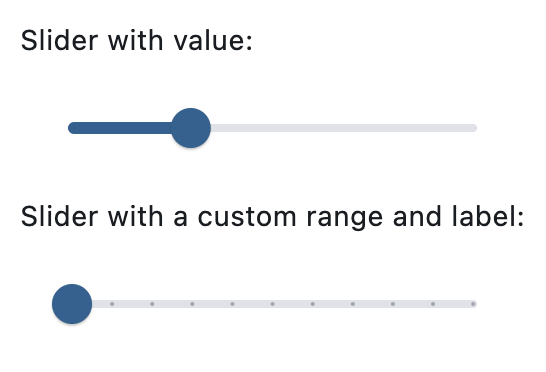
                    ft.Text("Slider with value:"),
                    ft.Slider(value=0.3),
                    ft.Text("Slider with a custom range and label:"),
                    ft.Slider(min=0, max=100, divisions=10, label="{value}%"),
                ]
            )
        )
    )


if __name__ == "__main__":
    ft.run(main)
Handling events
import flet as ft


def main(page: ft.Page):
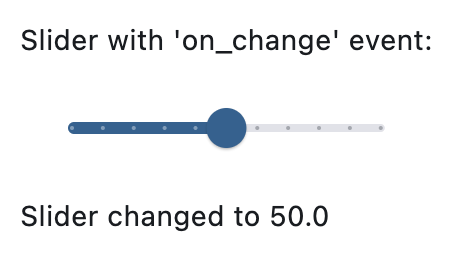
    def slider_changed(e: ft.Event[ft.Slider]):
        message.value = f"Slider changed to {e.control.value}"
        message.update()

    page.add(
        ft.SafeArea(
            content=ft.Column(
                controls=[
                    ft.Text("Slider with 'on_change' event:"),
                    ft.Slider(
                        key="slider",
                        min=0,
                        max=100,
                        divisions=10,
                        label="{value}%",
                        on_change=slider_changed,
                    ),
                    message := ft.Text(),
                ]
            )
        )
    )


if __name__ == "__main__":
    ft.run(main)
Properties
active_colorclass-attributeinstance-attribute
active_color: Optional[ColorValue] = NoneThe color to use for the portion of the slider track that is active.
The "active" side of the slider is the side between the thumb and the minimum value.
autofocusclass-attributeinstance-attribute
autofocus: bool = FalseTrue if the control will be selected as the initial focus. If there is more than one control on a page with autofocus set, then the first one added to the page will get focus.
divisionsclass-attributeinstance-attribute
divisions: Optional[int] = NoneThe number of discrete divisions.
Typically used with label to show the current discrete value.
If None, this slider is continuous.
inactive_colorclass-attributeinstance-attribute
inactive_color: Optional[ColorValue] = NoneThe color for the inactive portion of the slider track.
The "inactive" side of the slider is the side between the thumb and the maximum value.
interactionclass-attributeinstance-attribute
interaction: Optional[SliderInteraction] = NoneThe allowed way for the user to interact with this slider.
If None, flet.SliderTheme.interaction is used.
If that's is also None, defaults to flet.SliderInteraction.TAP_AND_SLIDE.
labelclass-attributeinstance-attribute
label: Optional[str] = NoneA label to show above the slider when the slider is active. The value of label may contain {value} which will be dynamically replaced with a current slider value. For example, "Volume: {value}".
It is used to display the value of a discrete slider, and it is displayed as part of the value indicator shape.
If not set, then the value indicator will not be displayed.
maxclass-attributeinstance-attribute
max: Annotated[Number, V.ge_field(min), V.ge_field(value)] = 1.0The maximum value the user can select.
If the min is equal to the max, then this slider is disabled.
minclass-attributeinstance-attribute
min: Annotated[Number, V.le_field(max), V.le_field(value)] = 0.0The minimum value the user can select.
If the max is equal to the min, then this slider is disabled.
mouse_cursorclass-attributeinstance-attribute
mouse_cursor: Optional[MouseCursor] = NoneThe cursor to be displayed when a mouse pointer enters or is hovering over this control.
overlay_colorclass-attributeinstance-attribute
overlay_color: Optional[ControlStateValue[ColorValue]] = NoneThe highlight color that's typically used to indicate that the range slider thumb is in flet.ControlState.HOVERED or flet.ControlState.DRAGGED states.
paddingclass-attributeinstance-attribute
padding: Optional[PaddingValue] = NoneDetermines the padding around this slider.
roundclass-attributeinstance-attribute
round: int = 0The number of decimals displayed on the label containing value.
Defaults to 0, which displays value rounded to the nearest integer.
secondary_active_colorclass-attributeinstance-attribute
secondary_active_color: Optional[ColorValue] = NoneThe color to use for the portion of the slider track between the thumb and the secondary_track_value.
secondary_track_valueclass-attributeinstance-attribute
secondary_track_value: Optional[Number] = NoneThe secondary track value for this slider.
If not null, a secondary track using secondary_active_color is drawn between
the thumb and this value, over the inactive track. If less than value, then
the secondary track is not shown.
It can be ideal for media scenarios such as showing the buffering progress
while the value shows the play progress.
thumb_colorclass-attributeinstance-attribute
thumb_color: Optional[ColorValue] = NoneThe color of the thumb.
valueclass-attributeinstance-attribute
value: Annotated[Optional[Number], V.ge_field(min), V.le_field(max)] = NoneThe currently selected value for this slider.
The slider's thumb is drawn at a position that corresponds to this value.
Defaults to value of min.
year_2023class-attributeinstance-attribute
year_2023: Optional[bool] = NoneIf this is set to False, this slider will use the latest Material Design 3 appearance, which was introduced in December 2023.
When True, the Slider will use the 2023 Material Design 3 appearance.
If not set, then the flet.SliderTheme.year_2023 will be used, which is
False by default.
If flet.Theme.use_material3 is False, then this property is ignored.
Events
on_blurclass-attributeinstance-attribute
on_blur: Optional[ControlEventHandler[Slider]] = NoneCalled when this slider has lost focus.
on_changeclass-attributeinstance-attribute
on_change: Optional[ControlEventHandler[Slider]] = NoneCalled when the state of this slider is changed.
on_change_endclass-attributeinstance-attribute
on_change_end: Optional[ControlEventHandler[Slider]] = NoneCalled when the user is done selecting a new value for this slider.
on_change_startclass-attributeinstance-attribute
on_change_start: Optional[ControlEventHandler[Slider]] = NoneCalled when the user starts selecting a new value for this slider.
on_focusclass-attributeinstance-attribute
on_focus: Optional[ControlEventHandler[Slider]] = NoneCalled when this slider has received focus.