Row
Displays its children in a horizontal array.
To cause a child control to expand and fill the available horizontal space, set its expand property.
Example:
    ft.Row(
        controls=[
            ft.Card(
                shape=ft.ContinuousRectangleBorder(radius=10),
                content=ft.Container(
                    padding=5,
                    border_radius=ft.BorderRadius.all(5),
                    bgcolor=ft.Colors.AMBER_100,
                    content=ft.Text(f"Control {i}"),
                ),
            )
            for i in range(1, 6)
        ],
    )

Inherits: LayoutControl, ScrollableControl, AdaptiveControl
Properties
alignment- Defines how the child controls should be placed horizontally.controls- A list of Controls to display.intrinsic_height- Whether this row should be as tall as the tallest child control in controls.run_alignment- How the runs should be placed in the cross-axis when wrap isTrue.run_spacing- The spacing between runs when wrap isTrue.spacing- The spacing between the child controls.tight- Whether this row should occupy all available horizontal space (True), or only as much as needed by its children controls (False).vertical_alignment- Defines how the child controls should be placed vertically.wrap- Whether this row should put child controls into additional rows (runs) if they don't fit in a single row.
Examples
Spacing children
import flet as ft


def main(page: ft.Page):
    def generate_items(count: int):
        return [
            ft.Container(
                content=ft.Text(value=str(i)),
                alignment=ft.Alignment.CENTER,
                width=50,
                height=50,
                bgcolor=ft.Colors.AMBER,
                border_radius=ft.BorderRadius.all(5),
            )
            for i in range(1, count + 1)
        ]

    def handle_slider_change(e: ft.Event[ft.Slider]):
        row.spacing = int(e.control.value)
        row.update()

    row = ft.Row(spacing=0, scroll=ft.ScrollMode.AUTO, controls=generate_items(10))

    page.add(
        ft.SafeArea(
            content=ft.Column(
                controls=[
                    ft.Column(
                        controls=[
                            ft.Text("Spacing between items"),
                            ft.Slider(
                                key="slider",
                                min=0,
                                max=50,
                                divisions=50,
                                value=0,
                                label="{value}",
                                on_change=handle_slider_change,
                            ),
                        ]
                    ),
                    row,
                ]
            )
        )
    )


if __name__ == "__main__":
    ft.run(main)
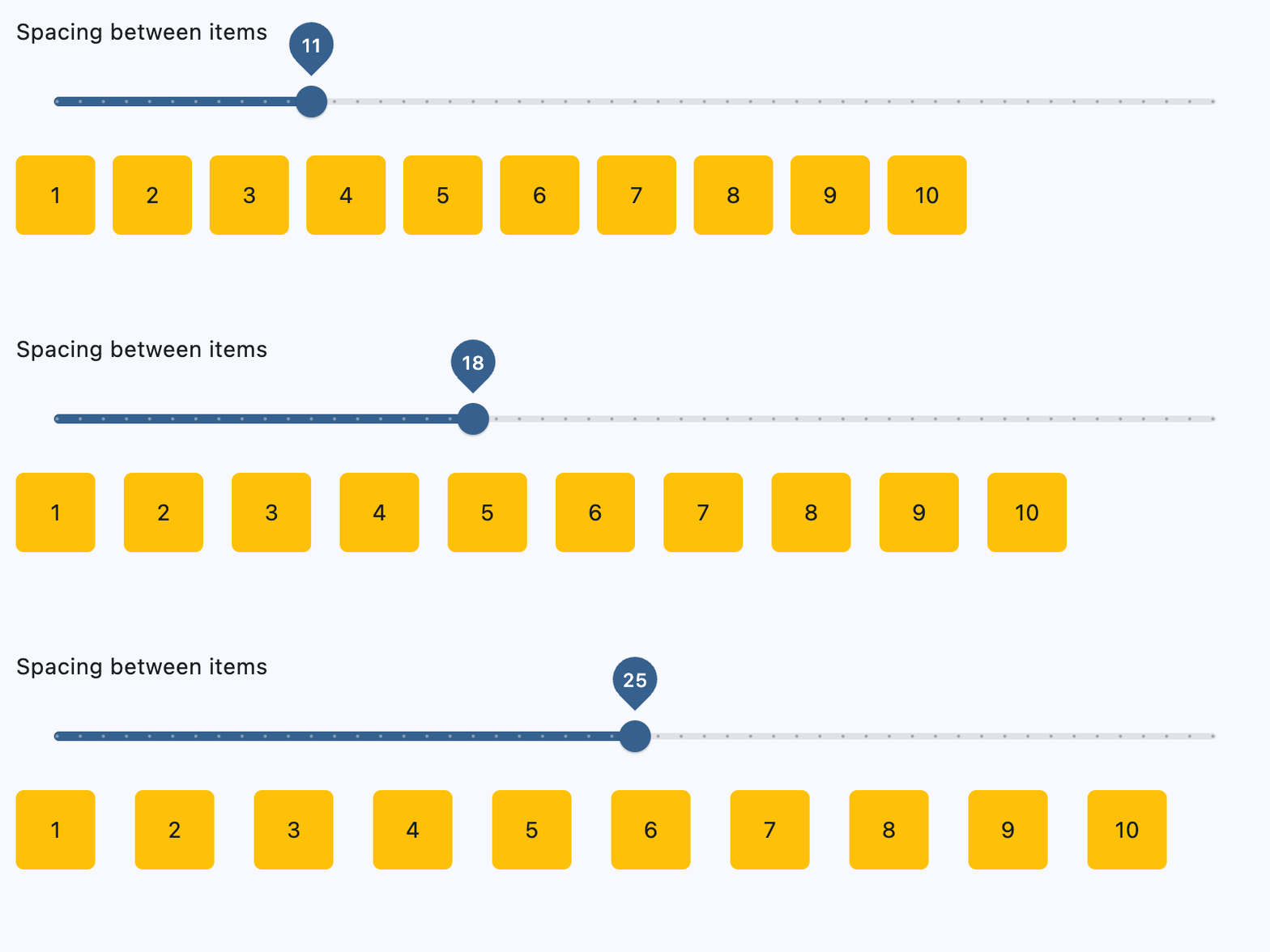
Wrapping children
import flet as ft


def main(page: ft.Page):
    def generate_items(count: int):
        return [
            ft.Container(
                content=ft.Text(value=str(i)),
                alignment=ft.Alignment.CENTER,
                width=50,
                height=50,
                bgcolor=ft.Colors.AMBER,
                border_radius=ft.BorderRadius.all(5),
            )
            for i in range(1, count + 1)
        ]

    def handle_slider_change(e: ft.Event[ft.Slider]):
        row.width = float(e.control.value)
        row.update()

    row = ft.Row(
        wrap=True,
        spacing=10,
        run_spacing=10,
        width=page.window.width,
        controls=generate_items(30),
    )

    page.add(
        ft.SafeArea(
            content=ft.Column(
                controls=[
                    ft.Column(
                        controls=[
                            ft.Text(
                                "Change the row width to see how child items wrap "
                                "onto multiple rows:"
                            ),
                            ft.Slider(
                                min=0,
                                max=page.window.width,
                                divisions=20,
                                value=page.window.width,
                                label="{value}",
                                on_change=handle_slider_change,
                            ),
                        ]
                    ),
                    row,
                ]
            )
        )
    )


if __name__ == "__main__":
    ft.run(main)
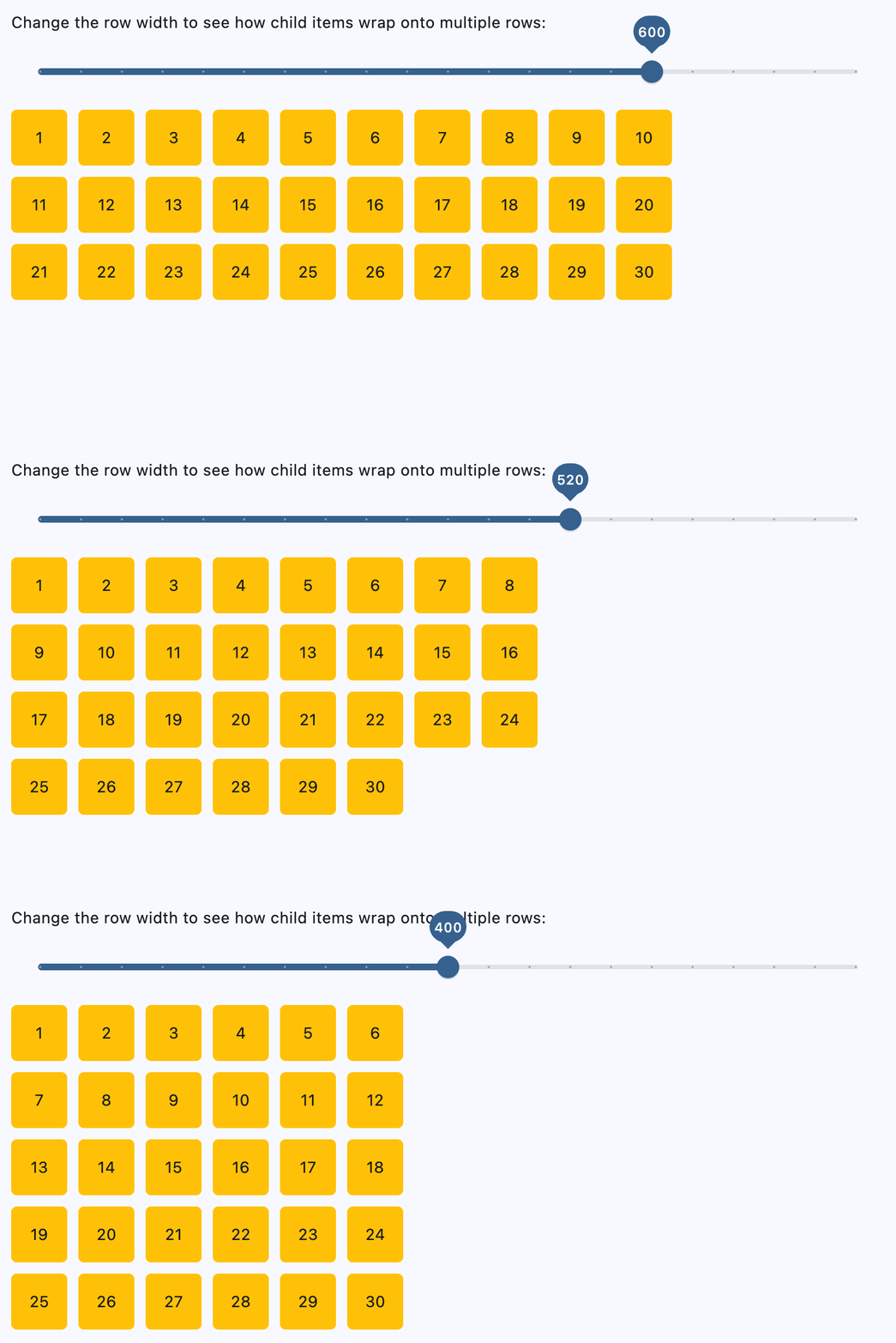
Setting horizontal alignment
import flet as ft


@ft.control
class RowWithAlignment(ft.Column):
    alignment: ft.MainAxisAlignment = ft.MainAxisAlignment.START

    def init(self):
        self.controls = [
            ft.Text(str(self.alignment), size=16),
            ft.Container(
                bgcolor=ft.Colors.AMBER_100,
                content=ft.Row(
                    alignment=self.alignment,
                    controls=self.generate_items(3),
                ),
            ),
        ]

    @staticmethod
    def generate_items(count: int):
        return [
            ft.Container(
                content=ft.Text(value=str(i)),
                alignment=ft.Alignment.CENTER,
                width=50,
                height=50,
                bgcolor=ft.Colors.AMBER_500,
            )
            for i in range(1, count + 1)
        ]


def main(page: ft.Page):
    page.scroll = ft.ScrollMode.AUTO
    page.add(
        ft.SafeArea(
            content=ft.Column(
                scroll=ft.ScrollMode.AUTO,
                controls=[
                    RowWithAlignment(alignment=ft.MainAxisAlignment.START),
                    RowWithAlignment(alignment=ft.MainAxisAlignment.CENTER),
                    RowWithAlignment(alignment=ft.MainAxisAlignment.END),
                    RowWithAlignment(alignment=ft.MainAxisAlignment.SPACE_BETWEEN),
                    RowWithAlignment(alignment=ft.MainAxisAlignment.SPACE_AROUND),
                    RowWithAlignment(alignment=ft.MainAxisAlignment.SPACE_EVENLY),
                ],
            )
        )
    )


if __name__ == "__main__":
    ft.run(main)
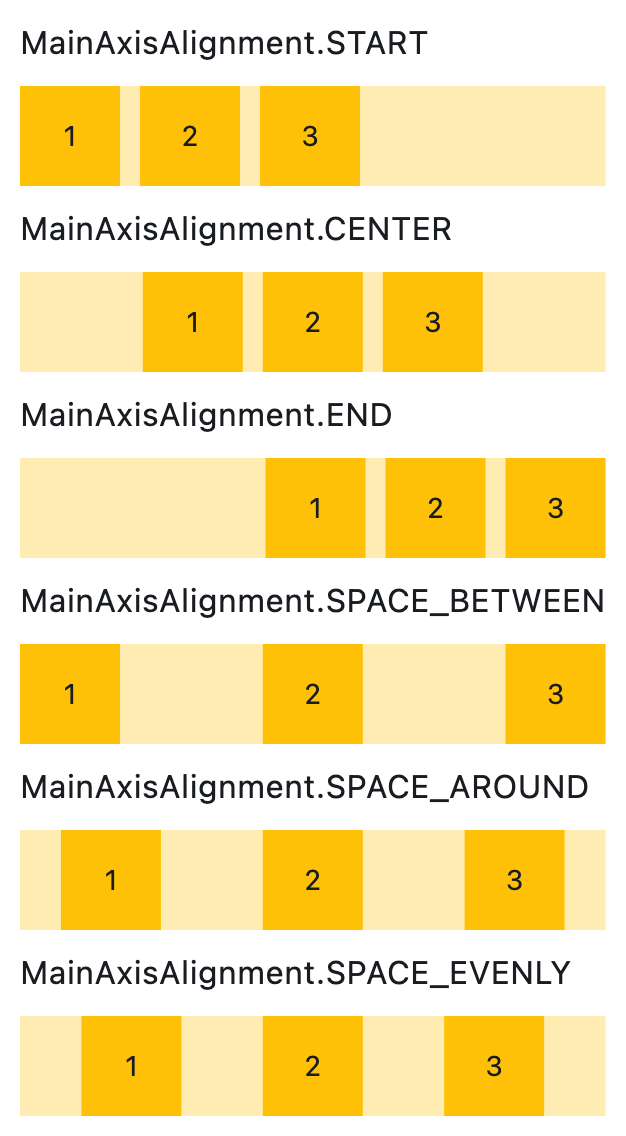
Setting vertical alignment
import flet as ft


@ft.control
class RowWithVerticalAlignment(ft.Column):
    alignment: ft.CrossAxisAlignment = ft.CrossAxisAlignment.START

    def init(self):
        self.controls = [
            ft.Text(str(self.alignment), size=16),
            ft.Container(
                bgcolor=ft.Colors.AMBER_100,
                height=150,
                content=ft.Row(
                    vertical_alignment=self.alignment,
                    controls=self.generate_items(3),
                ),
            ),
        ]

    @staticmethod
    def generate_items(count: int):
        return [
            ft.Container(
                content=ft.Text(value=str(i)),
                alignment=ft.Alignment.CENTER,
                width=50,
                height=50,
                bgcolor=ft.Colors.AMBER_500,
            )
            for i in range(1, count + 1)
        ]


def main(page: ft.Page):
    page.add(
        ft.SafeArea(
            content=ft.Column(
                controls=[
                    RowWithVerticalAlignment(alignment=ft.CrossAxisAlignment.START),
                    RowWithVerticalAlignment(alignment=ft.CrossAxisAlignment.CENTER),
                    RowWithVerticalAlignment(alignment=ft.CrossAxisAlignment.END),
                ]
            )
        )
    )


if __name__ == "__main__":
    ft.run(main)
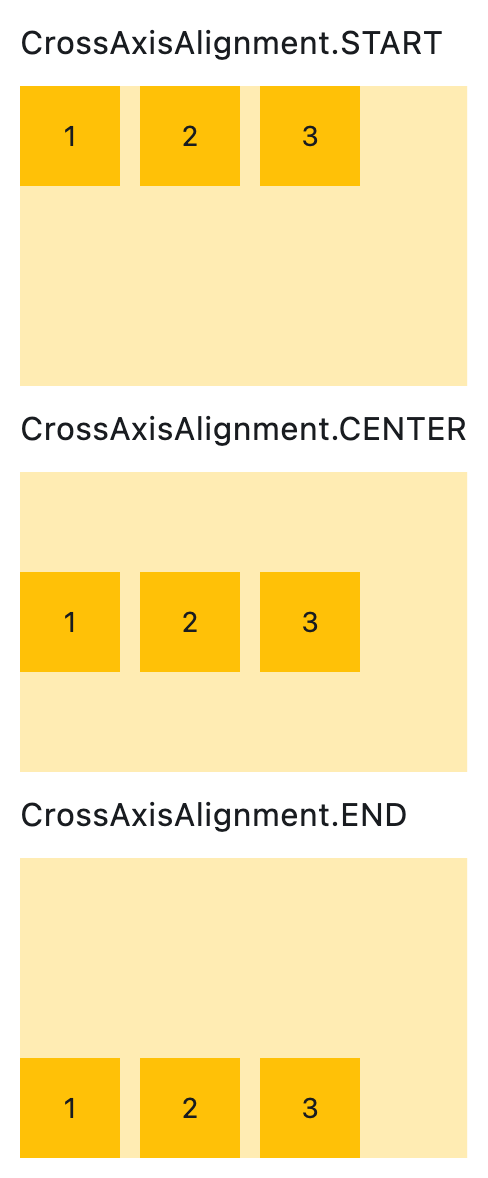
Properties
alignmentclass-attributeinstance-attribute
alignment: MainAxisAlignment = MainAxisAlignment.STARTDefines how the child controls should be placed horizontally.
controlsclass-attributeinstance-attribute
controls: list[Control] = field(default_factory=list)A list of Controls to display.
intrinsic_heightclass-attributeinstance-attribute
intrinsic_height: bool = FalseWhether this row should be as tall as the tallest child control in controls.
run_alignmentclass-attributeinstance-attribute
run_alignment: MainAxisAlignment = MainAxisAlignment.STARTHow the runs should be placed in the cross-axis when wrap is True.
run_spacingclass-attributeinstance-attribute
run_spacing: Number = 10The spacing between runs when wrap is True.
spacingclass-attributeinstance-attribute
spacing: Number = 10The spacing between the child controls.
Has effect only when alignment is set to flet.MainAxisAlignment.START, flet.MainAxisAlignment.END, or flet.MainAxisAlignment.CENTER.
tightclass-attributeinstance-attribute
tight: bool = FalseWhether this row should occupy all available horizontal space (True), or only as much as needed by its children controls (False).
Has effect only when wrap is False.
vertical_alignmentclass-attributeinstance-attribute
vertical_alignment: CrossAxisAlignment = CrossAxisAlignment.CENTERDefines how the child controls should be placed vertically.
When wrap is True, this property doesn't support
flet.CrossAxisAlignment.STRETCH or
flet.CrossAxisAlignment.BASELINE. If either is used,
flet.CrossAxisAlignment.CENTER will be applied instead.