ProgressBar
A material design linear progress indicator, also known as a progress bar.
A control that shows progress along a line.
Example:
ft.ProgressBar(width=400, value=0.8)

Inherits: LayoutControl
Properties
bar_height- The minimum height of the line used to draw the linear indicator.bgcolor- Color of the track being filled by the linear indicator.border_radius- The border radius of both the indicator and the track.color- The progress indicator's color.semantics_label- The semantics label for this progress indicator.semantics_value- The semantics label for this progress indicator.stop_indicator_color- The color of the stop indicator.stop_indicator_radius- The radius of the stop indicator.track_gap- The gap between the indicator and the track.value- The value of this progress indicator.year_2023- If this is set toFalse, the ProgressBar will use the latest Material Design 3 appearance, which was introduced in December 2023.
Examples
Determinate and indeterminate progress bars
import asyncio

import flet as ft


async def main(page: ft.Page):
    determinate_bar = ft.ProgressBar(width=400)
    determinate_message = ft.Text("Doing something...")

    page.add(
        ft.SafeArea(
            content=ft.Column(
                controls=[
                    ft.Text(
                        value="Linear progress indicator",
                        theme_style=ft.TextThemeStyle.HEADLINE_SMALL,
                    ),
                    ft.Column(controls=[determinate_message, determinate_bar]),
                    ft.Text(
                        value="Indeterminate progress bar",
                        theme_style=ft.TextThemeStyle.HEADLINE_SMALL,
                    ),
                    ft.ProgressBar(width=400, color=ft.Colors.AMBER),
                ]
            )
        )
    )

    for i in range(0, 101):
        determinate_bar.value = i * 0.01
        await asyncio.sleep(0.1)
        if i == 100:
            determinate_message.value = "Finished!"
        page.update()


if __name__ == "__main__":
    ft.run(main)
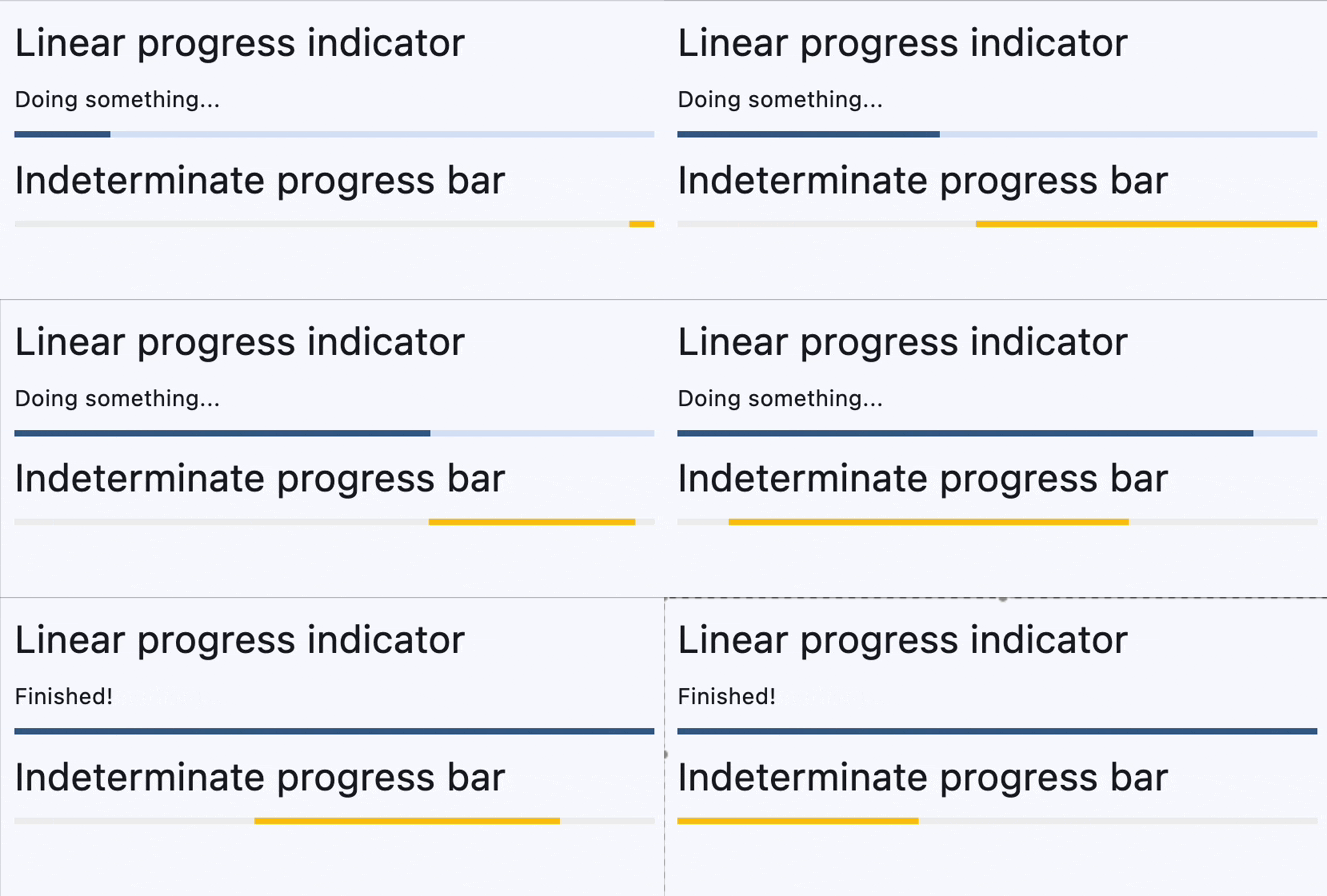
Properties
bar_heightclass-attributeinstance-attribute
bar_height: Annotated[Optional[Number], V.ge(0)] = NoneThe minimum height of the line used to draw the linear indicator.
Raises:
- ValueError - If it is not greater than or equal to
0.
bgcolorclass-attributeinstance-attribute
bgcolor: Optional[ColorValue] = NoneColor of the track being filled by the linear indicator.
border_radiusclass-attributeinstance-attribute
border_radius: Optional[BorderRadiusValue] = NoneThe border radius of both the indicator and the track.
Defaults to BorderRadius.all(0) - rectangular shape.
colorclass-attributeinstance-attribute
color: Optional[ColorValue] = NoneThe progress indicator's color.
semantics_labelclass-attributeinstance-attribute
semantics_label: Optional[str] = NoneThe semantics label for this progress indicator.
semantics_valueclass-attributeinstance-attribute
semantics_value: Annotated[Optional[Number], V.ge(0)] = NoneThe semantics label for this progress indicator.
Raises:
- ValueError - If it is not greater than or equal to
0.
stop_indicator_colorclass-attributeinstance-attribute
stop_indicator_color: Optional[ColorValue] = NoneThe color of the stop indicator.
If flet.ProgressBar.year_2023 is True or flet.Theme.use_material3
is False, then no stop indicator will be drawn.
If not set, then the flet.ProgressIndicatorTheme.stop_indicator_color will be used. If that is not set, then the flet.ColorScheme.primary will be used.
stop_indicator_radiusclass-attributeinstance-attribute
stop_indicator_radius: Optional[Number] = NoneThe radius of the stop indicator.
If flet.ProgressBar.year_2023 is True or flet.Theme.use_material3 is
False, then no stop indicator will be drawn.
Set stop_indicator_radius to 0 to hide the stop indicator.
If not set, then the flet.ProgressIndicatorTheme.stop_indicator_radius
will be used. If that is not set, then defaults to 2.
track_gapclass-attributeinstance-attribute
track_gap: Optional[Number] = NoneThe gap between the indicator and the track.
If flet.ProgressBar.year_2023 is True or
flet.Theme.use_material3 is False, then no track gap
will be drawn.
If not set, then the flet.ProgressIndicatorTheme.track_gap will be
used. If that is not set, then defaults to 4.
Set track_gap to 0 to hide the track gap.
valueclass-attributeinstance-attribute
value: Annotated[Optional[Number], V.ge(0)] = NoneThe value of this progress indicator.
A value of 0.0 means no progress and 1.0 means that progress is complete. The
value will be clamped to be in the range 0.0 - 1.0.
Defaults to None, meaning that this progress indicator is indeterminate -
displays a predetermined animation that does not indicate how much actual progress
is being made.
Raises:
- ValueError - If it is not greater than or equal to
0.
year_2023class-attributeinstance-attribute
year_2023: Optional[bool] = NoneIf this is set to False, the ProgressBar will use the latest Material Design 3 appearance, which was introduced in December 2023.
When True, the ProgressBar will use the 2023 Material Design 3 appearance.
If not set, then the flet.ProgressIndicatorTheme.year_2023 will be
used, which is False by default.
If flet.Theme.use_material3 is False, then this property is ignored.