DropdownM2
A dropdown lets the user select from a number of items. The dropdown shows the currently selected item as well as an arrow that opens a menu for selecting another item.
Example:
ft.DropdownM2(
    width=220,
    value="Alice",
    options=[
        ft.dropdownm2.Option(key="Alice", text="Alice"),
        ft.dropdownm2.Option(key="Bob", text="Bob"),
    ],
)

Inherits: FormFieldControl
Properties
alignment- Defines how thehintor the selected item is positioned within this dropdown.autofocus- True if the control will be selected as the initial focus.disabled_hint_content- A placeholderControlfor the dropdown's value that is displayed whenvalueisNoneand the dropdown is disabled.elevation- The dropdown's elevation.enable_feedback- Whether detected gestures should provide acoustic and/or haptic feedback.hint_content- A placeholderControlfor the dropdown's value that is displayed whenvalueisNone.item_height- The height of the items/options in the dropdown menu.max_menu_height- The maximum height of the dropdown menu.options- A list ofOptioncontrols representing items in this dropdown.options_fill_horizontally- Whether the dropdown's inner contents to horizontally fill its parent.padding- The padding around the visible portion of this dropdown.select_icon- The name of the icon orControlto use for the drop-down select button's icon.select_icon_disabled_color- The color of anyIcondescendant ofselect_iconif this button is disabled.select_icon_enabled_color- The color of anyIcondescendant ofselect_iconif this button is enabled.select_icon_size- The size of the icon button which wrapsselect_icon.value-keyvalue of the selected option.
Events
Examples
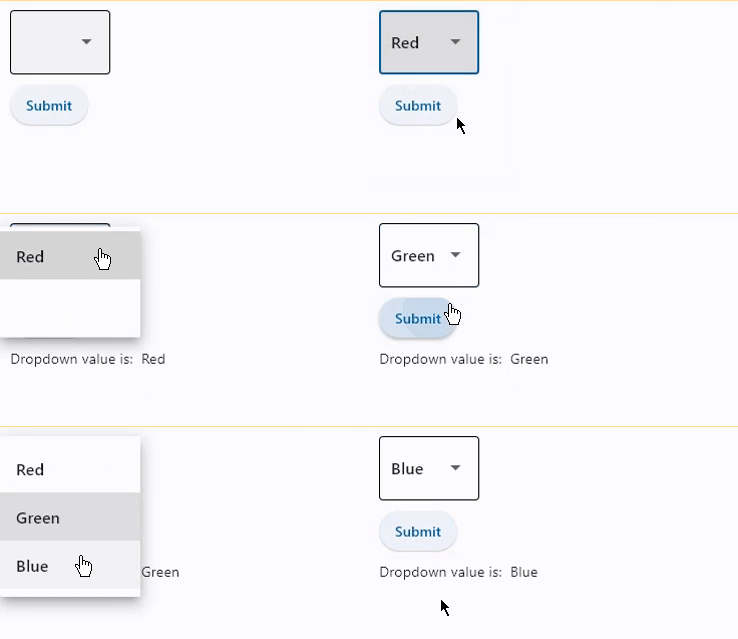
Basic Example
import flet as ft


def main(page: ft.Page):
    message = ft.Text()

    dd = ft.DropdownM2(
        width=100,
        value="Green",
        options=[
            ft.dropdownm2.Option("Red"),
            ft.dropdownm2.Option("Green"),
            ft.dropdownm2.Option("Blue"),
        ],
    )

    def handle_button_click(_: ft.Event[ft.Button]):
        message.value = f"Dropdown value is: {dd.value}"

    page.add(
        ft.SafeArea(
            content=ft.Column(
                controls=[
                    dd,
                    ft.Button(content="Submit", on_click=handle_button_click),
                    message,
                ],
            ),
        )
    )


if __name__ == "__main__":
    ft.run(main)
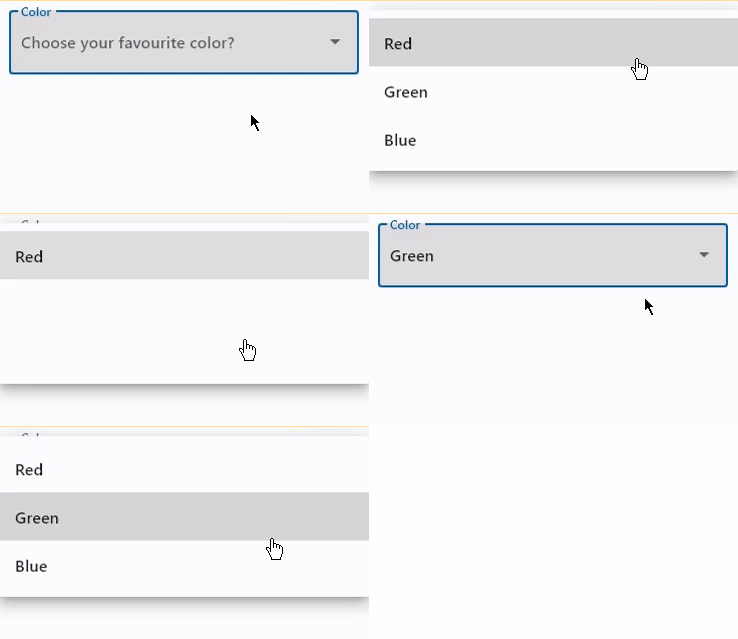
Dropdown with label and hint
import flet as ft


def main(page: ft.Page):
    page.add(
        ft.SafeArea(
            content=ft.DropdownM2(
                label="Color",
                hint_text="Choose your favourite color?",
                autofocus=True,
                color=ft.Colors.BLACK,
                options=[
                    ft.dropdownm2.Option("Red"),
                    ft.dropdownm2.Option("Green"),
                    ft.dropdownm2.Option("Blue"),
                ],
            ),
        )
    )


if __name__ == "__main__":
    ft.run(main)
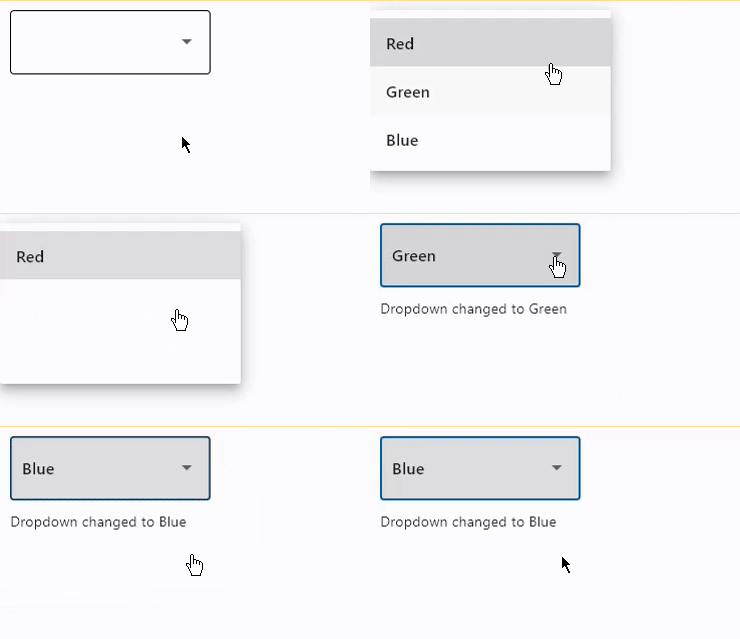
Handling events
import flet as ft


def main(page: ft.Page):
    message = ft.Text()

    def dropdown_changed(e: ft.Event[ft.DropdownM2]):
        message.value = f"Dropdown changed to {e.control.value}"

    page.add(
        ft.SafeArea(
            content=ft.Column(
                controls=[
                    ft.DropdownM2(
                        width=200,
                        color=ft.Colors.BLUE_GREY_700,
                        on_change=dropdown_changed,
                        options=[
                            ft.dropdownm2.Option("Red"),
                            ft.dropdownm2.Option("Green"),
                            ft.dropdownm2.Option("Blue"),
                        ],
                    ),
                    message,
                ],
            ),
        )
    )


if __name__ == "__main__":
    ft.run(main)
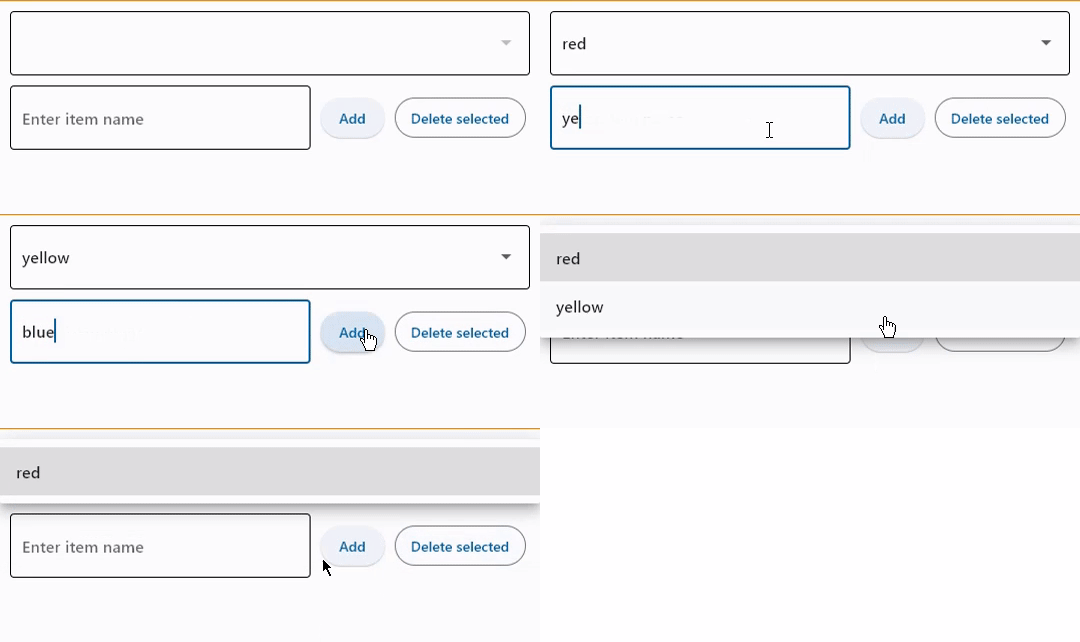
Add and delete options
import flet as ft


def main(page: ft.Page):
    dropdown = ft.DropdownM2(options=[], color=ft.Colors.BLUE_400)
    input_field = ft.TextField(hint_text="Enter item name")

    def find_option(option_name: str):
        for option in dropdown.options:
            if option_name == option.key:
                return option
        return None

    def handle_addition(_: ft.Event[ft.Button]):
        dropdown.options.append(ft.dropdownm2.Option(input_field.value))
        dropdown.value = input_field.value
        input_field.value = ""
        dropdown.update()
        input_field.update()

    def handle_deletion(_: ft.Event[ft.OutlinedButton]):
        option = find_option(dropdown.value)
        if option is not None:
            dropdown.options.remove(option)
            dropdown.update()

    page.add(
        ft.SafeArea(
            content=ft.Column(
                controls=[
                    dropdown,
                    ft.Row(
                        controls=[
                            input_field,
                            ft.Button(content="Add", on_click=handle_addition),
                            ft.OutlinedButton(
                                content="Delete selected",
                                on_click=handle_deletion,
                                style=ft.ButtonStyle(bgcolor=ft.Colors.RED),
                            ),
                        ],
                    ),
                ],
            ),
        )
    )


if __name__ == "__main__":
    ft.run(main)
Properties
alignmentclass-attributeinstance-attribute
alignment: Optional[Alignment] = NoneDefines how the hint or the selected item is positioned within this dropdown.
autofocusclass-attributeinstance-attribute
autofocus: bool = FalseTrue if the control will be selected as the initial focus. If there is more than one control on a page with autofocus set, then the first one added to the page will get focus.
disabled_hint_contentclass-attributeinstance-attribute
disabled_hint_content: Optional[Control] = NoneA placeholder Control for the dropdown's value that is displayed when value is None and the dropdown is disabled.
enable_feedbackclass-attributeinstance-attribute
enable_feedback: Optional[bool] = NoneWhether detected gestures should provide acoustic and/or haptic feedback. On Android, for example, setting this to True produce a click sound and a long-press will produce a short vibration.
hint_contentclass-attributeinstance-attribute
hint_content: Optional[Control] = NoneA placeholder Control for the dropdown's value that is displayed when value is None.
item_heightclass-attributeinstance-attribute
item_height: Optional[Number] = NoneThe height of the items/options in the dropdown menu.
max_menu_heightclass-attributeinstance-attribute
max_menu_height: Optional[Number] = NoneThe maximum height of the dropdown menu.
optionsclass-attributeinstance-attribute
options: Optional[list[Option]] = NoneA list of Option controls representing items in this dropdown.
options_fill_horizontallyclass-attributeinstance-attribute
options_fill_horizontally: bool = TrueWhether the dropdown's inner contents to horizontally fill its parent. By default this button's inner width is the minimum size of its content.
If True, the inner width is expanded to fill its surrounding container.
paddingclass-attributeinstance-attribute
padding: Optional[PaddingValue] = NoneThe padding around the visible portion of this dropdown.
select_iconclass-attributeinstance-attribute
select_icon: Optional[IconDataOrControl] = NoneThe name of the icon or Control to use for the drop-down select button's icon.
Defaults to Icon(ft.Icons.ARROW_DROP_DOWN).
select_icon_disabled_colorclass-attributeinstance-attribute
select_icon_disabled_color: Optional[ColorValue] = NoneThe color of any Icon descendant of select_icon if this button is disabled.
select_icon_enabled_colorclass-attributeinstance-attribute
select_icon_enabled_color: Optional[ColorValue] = NoneThe color of any Icon descendant of select_icon if this button is enabled.
Events
on_blurclass-attributeinstance-attribute
on_blur: Optional[ControlEventHandler[DropdownM2]] = NoneCalled when the control has lost focus.
on_changeclass-attributeinstance-attribute
on_change: Optional[ControlEventHandler[DropdownM2]] = NoneCalled when the selected item of this dropdown has changed.
on_clickclass-attributeinstance-attribute
on_click: Optional[ControlEventHandler[DropdownM2]] = NoneCalled when this dropdown is clicked.
on_focusclass-attributeinstance-attribute
on_focus: Optional[ControlEventHandler[DropdownM2]] = NoneCalled when the control has received focus.