CupertinoSlider
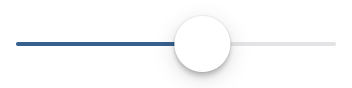
An iOS-type slider.
It provides a visual indication of adjustable content, as well as the current setting in the total range of content.
Use a slider when you want people to set defined values (such as volume or brightness), or when people would benefit from instant feedback on the effect of setting changes.
Example:
ft.CupertinoSlider(value=0.6)
Inherits: LayoutControl
Properties
active_color- The color to use for the portion of the slider track that is active.divisions- The number of discrete divisions.max- The maximum value the user can select.min- The minimum value the user can select.thumb_color- The color of this slider's thumb.value- The currently selected value for this slider.
Events
on_blur- Called when this slider has lost focus.on_change- Called when the state of this slider changed.on_change_end- Called when the user is done selecting a new value for this slider.on_change_start- Called when the user starts selecting a new value for this slider.on_focus- Called when this slider has received focus.
Examples
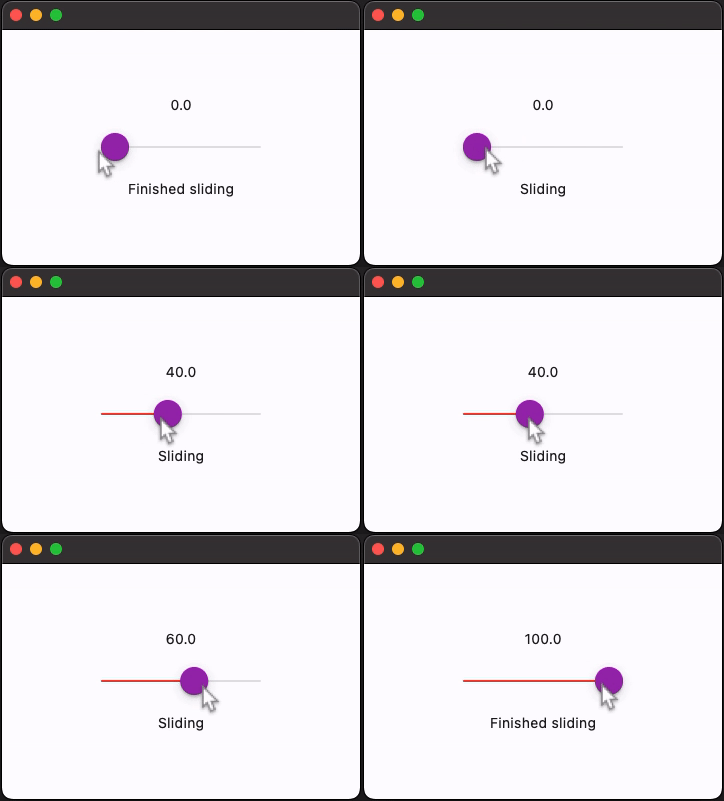
Handling events
import flet as ft


def main(page: ft.Page):
    page.horizontal_alignment = ft.CrossAxisAlignment.CENTER
    page.vertical_alignment = ft.MainAxisAlignment.CENTER
    page.theme_mode = ft.ThemeMode.LIGHT

    slider_value = ft.Text("0.0")
    slider_status = ft.Text()

    def handle_change_start(_: ft.Event[ft.CupertinoSlider]):
        slider_status.value = "Sliding"

    def handle_change(e: ft.Event[ft.CupertinoSlider]):
        slider_value.value = str(e.control.value)

    def handle_change_end(_: ft.Event[ft.CupertinoSlider]):
        slider_status.value = "Finished sliding"

    page.add(
        ft.SafeArea(
            content=ft.Column(
                horizontal_alignment=ft.CrossAxisAlignment.CENTER,
                controls=[
                    slider_value,
                    ft.CupertinoSlider(
                        divisions=20,
                        min=0,
                        max=100,
                        active_color=ft.Colors.PURPLE,
                        thumb_color=ft.Colors.PURPLE,
                        on_change_start=handle_change_start,
                        on_change_end=handle_change_end,
                        on_change=handle_change,
                    ),
                    slider_status,
                ],
            ),
        )
    )


if __name__ == "__main__":
    ft.run(main)
Properties
active_colorclass-attributeinstance-attribute
active_color: Optional[ColorValue] = NoneThe color to use for the portion of the slider track that is active.
The "active" side of the slider is the side between the thumb and the minimum value.
divisionsclass-attributeinstance-attribute
divisions: Optional[int] = NoneThe number of discrete divisions.
If None, the slider is continuous.
maxclass-attributeinstance-attribute
max: Annotated[Number, V.ge_field(min), V.ge_field(value)] = 1.0The maximum value the user can select.
If min is equal to the max, then this slider is disabled.
minclass-attributeinstance-attribute
min: Annotated[Number, V.le_field(max), V.le_field(value)] = 0.0The minimum value the user can select.
If max is equal to the min, then this slider is disabled.
thumb_colorclass-attributeinstance-attribute
thumb_color: Optional[ColorValue] = NoneThe color of this slider's thumb.
Events
on_blurclass-attributeinstance-attribute
on_blur: Optional[ControlEventHandler[CupertinoSlider]] = NoneCalled when this slider has lost focus.
on_changeclass-attributeinstance-attribute
on_change: Optional[ControlEventHandler[CupertinoSlider]] = NoneCalled when the state of this slider changed.
on_change_endclass-attributeinstance-attribute
on_change_end: Optional[ControlEventHandler[CupertinoSlider]] = NoneCalled when the user is done selecting a new value for this slider.
on_change_startclass-attributeinstance-attribute
on_change_start: Optional[ControlEventHandler[CupertinoSlider]] = NoneCalled when the user starts selecting a new value for this slider.
on_focusclass-attributeinstance-attribute
on_focus: Optional[ControlEventHandler[CupertinoSlider]] = NoneCalled when this slider has received focus.