Canvas
Canvas is a control for drawing arbitrary graphics using a set of primitives or "shapes" such as line, arc, path and text.
Example:
cv.Canvas(
    width=160,
    height=160,
    shapes=[
        cv.Rect(
            0,
            0,
            160,
            160,
            paint=ft.Paint(
                color=ft.Colors.BLUE_100,
                style=ft.PaintingStyle.FILL,
            ),
        ),
        cv.Circle(
            80,
            80,
            50,
            paint=ft.Paint(
                color=ft.Colors.BLUE_400,
                style=ft.PaintingStyle.FILL,
            ),
        ),
    ],
)

Inherits: LayoutControl
Properties
content- The content of this canvas.resize_interval- Sampling interval in milliseconds foron_resizeevent.shapes- A list of shapes to draw on this canvas.
Events
on_resize- Called when the size of this canvas has changed.
Methods
capture- Captures the current visual state of the canvas.clear_capture- Clears the previously captured canvas image.get_capture- Retrieves the most recent canvas capture as PNG bytes.
Examples
Smiling face
import math

import flet as ft
import flet.canvas as cv


def main(page: ft.Page):
    stroke_paint = ft.Paint(stroke_width=2, style=ft.PaintingStyle.STROKE)
    fill_paint = ft.Paint(style=ft.PaintingStyle.FILL)

    page.add(
        ft.SafeArea(
            content=cv.Canvas(
                width=float("inf"),
                expand=True,
                shapes=[
                    cv.Circle(x=100, y=100, radius=50, paint=stroke_paint),
                    cv.Circle(x=80, y=90, radius=10, paint=stroke_paint),
                    cv.Circle(x=84, y=87, radius=5, paint=fill_paint),
                    cv.Circle(x=120, y=90, radius=10, paint=stroke_paint),
                    cv.Circle(x=124, y=87, radius=5, paint=fill_paint),
                    cv.Arc(
                        x=70,
                        y=95,
                        width=60,
                        height=40,
                        start_angle=0,
                        sweep_angle=math.pi,
                        paint=stroke_paint,
                    ),
                ],
            )
        )
    )


if __name__ == "__main__":
    ft.run(main)

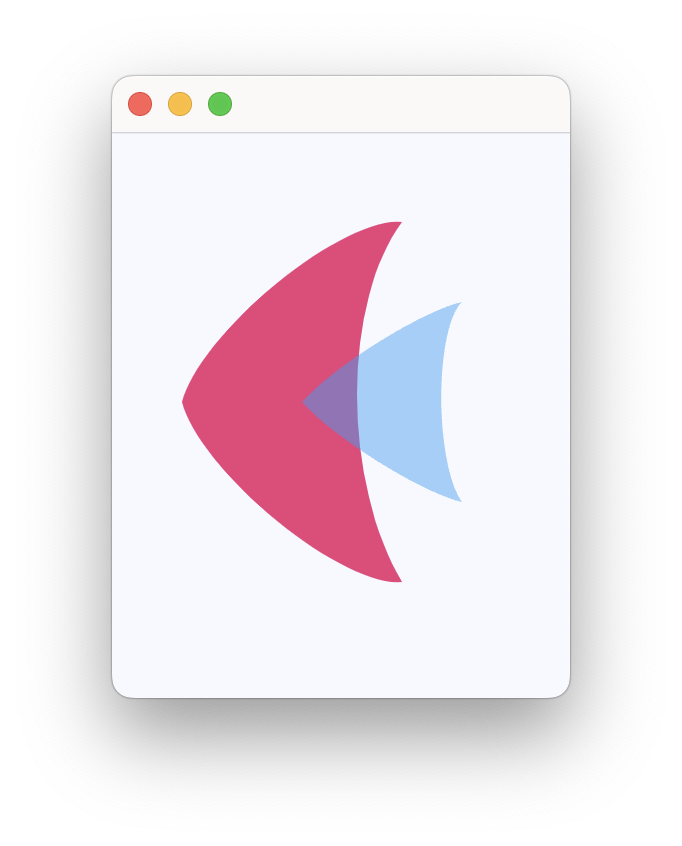
Flet logo
import flet as ft
import flet.canvas as cv


def main(page: ft.Page):
    page.theme_mode = ft.ThemeMode.LIGHT

    page.add(
        ft.SafeArea(
            content=cv.Canvas(
                width=float("inf"),
                expand=True,
                shapes=[
                    cv.Path(
                        elements=[
                            cv.Path.MoveTo(x=25, y=125),
                            cv.Path.QuadraticTo(cp1x=50, cp1y=25, x=135, y=35, w=0.35),
                            cv.Path.QuadraticTo(cp1x=75, cp1y=115, x=135, y=215, w=0.6),
                            cv.Path.QuadraticTo(cp1x=50, cp1y=225, x=25, y=125, w=0.35),
                        ],
                        paint=ft.Paint(
                            stroke_width=2,
                            style=ft.PaintingStyle.FILL,
                            color=ft.Colors.PINK_400,
                        ),
                    ),
                    cv.Path(
                        elements=[
                            cv.Path.MoveTo(x=85, y=125),
                            cv.Path.QuadraticTo(cp1x=120, cp1y=85, x=165, y=75, w=0.5),
                            cv.Path.QuadraticTo(
                                cp1x=120, cp1y=115, x=165, y=175, w=0.3
                            ),
                            cv.Path.QuadraticTo(cp1x=120, cp1y=165, x=85, y=125, w=0.5),
                        ],
                        paint=ft.Paint(
                            stroke_width=2,
                            style=ft.PaintingStyle.FILL,
                            color=ft.Colors.with_opacity(0.5, ft.Colors.BLUE_400),
                        ),
                    ),
                ],
            )
        )
    )


if __name__ == "__main__":
    ft.run(main)
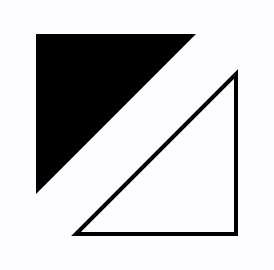
Triangles
import flet as ft
import flet.canvas as cv


def main(page: ft.Page):
    page.add(
        ft.SafeArea(
            content=cv.Canvas(
                width=float("inf"),
                expand=True,
                shapes=[
                    cv.Path(
                        paint=ft.Paint(style=ft.PaintingStyle.FILL),
                        elements=[
                            cv.Path.MoveTo(x=25, y=25),
                            cv.Path.LineTo(x=105, y=25),
                            cv.Path.LineTo(x=25, y=105),
                        ],
                    ),
                    cv.Path(
                        paint=ft.Paint(stroke_width=2, style=ft.PaintingStyle.STROKE),
                        elements=[
                            cv.Path.MoveTo(x=125, y=125),
                            cv.Path.LineTo(x=125, y=45),
                            cv.Path.LineTo(x=45, y=125),
                            cv.Path.Close(),
                        ],
                    ),
                ],
            )
        )
    )


if __name__ == "__main__":
    ft.run(main)
Bezier curves
import flet as ft
import flet.canvas as cv


def main(page: ft.Page):
    cp = cv.Canvas(
        width=float("inf"),
        expand=True,
        shapes=[
            cv.Path(
                paint=ft.Paint(stroke_width=2, style=ft.PaintingStyle.STROKE),
                elements=[
                    cv.Path.MoveTo(x=75, y=25),
                    cv.Path.QuadraticTo(cp1x=25, cp1y=25, x=25, y=62.5),
                    cv.Path.QuadraticTo(cp1x=25, cp1y=100, x=50, y=100),
                    cv.Path.QuadraticTo(cp1x=50, cp1y=120, x=30, y=125),
                    cv.Path.QuadraticTo(cp1x=60, cp1y=120, x=65, y=100),
                    cv.Path.QuadraticTo(cp1x=125, cp1y=100, x=125, y=62.5),
                    cv.Path.QuadraticTo(cp1x=125, cp1y=25, x=75, y=25),
                ],
            ),
            cv.Path(
                elements=[
                    cv.Path.SubPath(
                        x=100,
                        y=100,
                        elements=[
                            cv.Path.MoveTo(x=75, y=40),
                            cv.Path.CubicTo(
                                cp1x=75, cp1y=37, cp2x=70, cp2y=25, x=50, y=25
                            ),
                            cv.Path.CubicTo(
                                cp1x=20, cp1y=25, cp2x=20, cp2y=62.5, x=20, y=62.5
                            ),
                            cv.Path.CubicTo(
                                cp1x=20, cp1y=80, cp2x=40, cp2y=102, x=75, y=120
                            ),
                            cv.Path.CubicTo(
                                cp1x=110, cp1y=102, cp2x=130, cp2y=80, x=130, y=62.5
                            ),
                            cv.Path.CubicTo(
                                cp1x=130, cp1y=62.5, cp2x=130, cp2y=25, x=100, y=25
                            ),
                            cv.Path.CubicTo(
                                cp1x=85, cp1y=25, cp2x=75, cp2y=37, x=75, y=40
                            ),
                        ],
                    )
                ],
                paint=ft.Paint(
                    style=ft.PaintingStyle.FILL,
                    gradient=ft.PaintRadialGradient(
                        center=ft.Offset(150, 150),
                        radius=50,
                        colors=[ft.Colors.PINK_100, ft.Colors.PINK],
                    ),
                ),
            ),
        ],
    )

    page.add(ft.SafeArea(content=cp))


if __name__ == "__main__":
    ft.run(main)

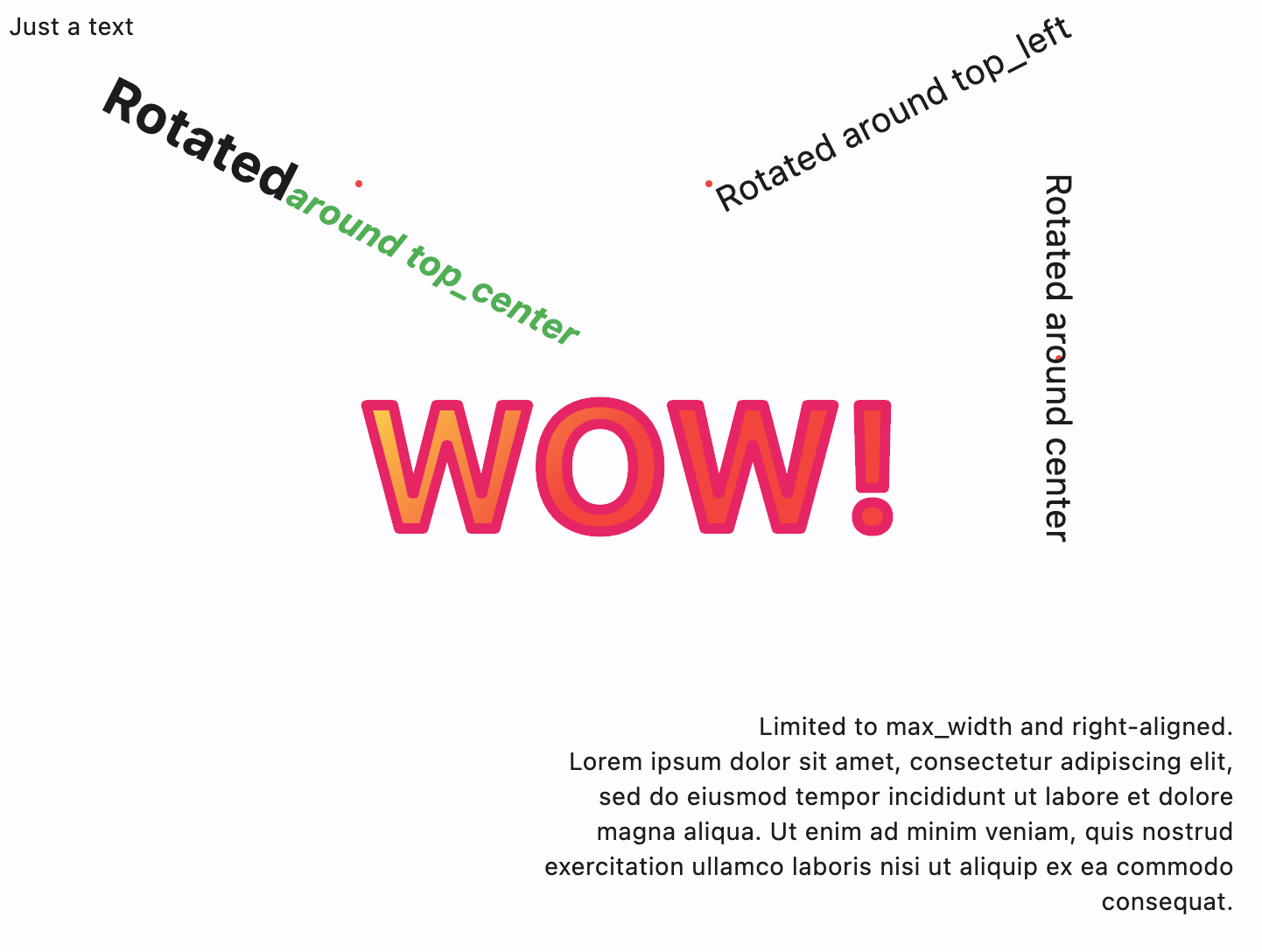
Text
import math

import flet as ft
import flet.canvas as cv


def main(page: ft.Page):
    page.add(
        ft.SafeArea(
            content=cv.Canvas(
                width=float("inf"),
                expand=True,
                shapes=[
                    cv.Text(x=0, y=0, value="Just a text"),
                    cv.Circle(
                        x=200, y=100, radius=2, paint=ft.Paint(color=ft.Colors.RED)
                    ),
                    cv.Text(
                        x=200,
                        y=100,
                        style=ft.TextStyle(weight=ft.FontWeight.BOLD, size=30),
                        alignment=ft.Alignment.TOP_CENTER,
                        rotate=math.pi * 0.15,
                        value="Rotated",
                        spans=[
                            ft.TextSpan(
                                text="around top_center",
                                style=ft.TextStyle(
                                    italic=True, color=ft.Colors.GREEN, size=20
                                ),
                            )
                        ],
                    ),
                    cv.Circle(
                        x=400, y=100, radius=2, paint=ft.Paint(color=ft.Colors.RED)
                    ),
                    cv.Text(
                        x=400,
                        y=100,
                        value="Rotated around top_left",
                        style=ft.TextStyle(size=20),
                        alignment=ft.Alignment.TOP_LEFT,
                        rotate=math.pi * -0.15,
                    ),
                    cv.Circle(
                        x=600, y=200, radius=2, paint=ft.Paint(color=ft.Colors.RED)
                    ),
                    cv.Text(
                        x=600,
                        y=200,
                        value="Rotated around center",
                        style=ft.TextStyle(size=20),
                        alignment=ft.Alignment.CENTER,
                        rotate=math.pi / 2,
                    ),
                    cv.Text(
                        x=300,
                        y=400,
                        value=(
                            "Limited to max_width and right-aligned.\n"
                            "Lorem ipsum dolor sit amet, consectetur adipiscing elit, "
                            "sed do eiusmod tempor incididunt ut labore et dolore "
                            "magna aliqua. Ut enim ad minim veniam, quis nostrud "
                            "exercitation "
                            "ullamco laboris nisi ut aliquip ex ea commodo consequat."
                        ),
                        text_align=ft.TextAlign.RIGHT,
                        max_width=400,
                    ),
                    cv.Text(
                        x=200,
                        y=200,
                        value="WOW!",
                        style=ft.TextStyle(
                            weight=ft.FontWeight.BOLD,
                            size=100,
                            foreground=ft.Paint(
                                color=ft.Colors.PINK,
                                stroke_width=6,
                                style=ft.PaintingStyle.STROKE,
                                stroke_join=ft.StrokeJoin.ROUND,
                                stroke_cap=ft.StrokeCap.ROUND,
                            ),
                        ),
                    ),
                    cv.Text(
                        x=200,
                        y=200,
                        value="WOW!",
                        style=ft.TextStyle(
                            weight=ft.FontWeight.BOLD,
                            size=100,
                            foreground=ft.Paint(
                                gradient=ft.PaintLinearGradient(
                                    begin=(200, 200),
                                    end=(300, 300),
                                    colors=[ft.Colors.YELLOW, ft.Colors.RED],
                                ),
                                stroke_join=ft.StrokeJoin.ROUND,
                                stroke_cap=ft.StrokeCap.ROUND,
                            ),
                        ),
                    ),
                ],
            )
        )
    )


if __name__ == "__main__":
    ft.run(main)
Free-hand drawing with image capture
from dataclasses import dataclass

import flet as ft
import flet.canvas as cv

MAX_SHAPES_PER_CAPTURE = 30


@dataclass
class State:
    x: float = 0
    y: float = 0
    shapes_count: int = 1


state = State()


def main(page: ft.Page):
    page.title = "Canvas Example"

    file_picker = ft.FilePicker()

    def handle_pan_start(e: ft.DragStartEvent):
        state.x = e.local_position.x
        state.y = e.local_position.y

    async def handle_pan_update(e: ft.DragUpdateEvent):
        # ft.context.disable_auto_update()
        canvas.shapes.append(
            cv.Line(
                x1=state.x,
                y1=state.y,
                x2=e.local_position.x,
                y2=e.local_position.y,
                paint=ft.Paint(stroke_width=3),
            )
        )
        canvas.update()
        state.shapes_count += 1

        if state.shapes_count == MAX_SHAPES_PER_CAPTURE:
            await canvas.capture()
            canvas.shapes.clear()
            canvas.update()
            state.shapes_count = 0

        state.x = e.local_position.x
        state.y = e.local_position.y

    canvas = cv.Canvas(
        expand=False,
        shapes=[
            cv.Fill(ft.Paint(color=ft.Colors.WHITE)),
        ],
        content=ft.GestureDetector(
            on_pan_start=handle_pan_start,
            on_pan_update=handle_pan_update,
            drag_interval=10,
        ),
    )

    async def save_image():
        await canvas.capture()
        capture = await canvas.get_capture()
        if capture:
            file_path = await file_picker.save_file(
                file_name="flet_picture.png", src_bytes=capture
            )
            if file_path and page.platform in [
                ft.PagePlatform.MACOS,
                ft.PagePlatform.WINDOWS,
                ft.PagePlatform.LINUX,
            ]:
                with open(file_path, "wb") as f:
                    f.write(capture)

    page.add(
        ft.SafeArea(
            expand=True,
            content=ft.Column(
                controls=[
                    ft.Button("Save image", on_click=save_image),
                    ft.Container(
                        border_radius=5,
                        border=ft.Border.all(2),
                        bgcolor=ft.Colors.WHITE,
                        width=float("inf"),
                        expand=True,
                        content=canvas,
                    ),
                ]
            ),
        ),
    )


if __name__ == "__main__":
    ft.run(main)
Gradients
import math

import flet as ft
import flet.canvas as cv


def main(page: ft.Page):
    page.add(
        ft.SafeArea(
            content=cv.Canvas(
                width=float("inf"),
                expand=True,
                shapes=[
                    cv.Rect(
                        x=10,
                        y=10,
                        width=100,
                        height=100,
                        border_radius=5,
                        paint=ft.Paint(
                            style=ft.PaintingStyle.FILL,
                            gradient=ft.PaintLinearGradient(
                                begin=(0, 10),
                                end=(100, 50),
                                colors=[ft.Colors.BLUE, ft.Colors.YELLOW],
                            ),
                        ),
                    ),
                    cv.Circle(
                        x=60,
                        y=170,
                        radius=50,
                        paint=ft.Paint(
                            style=ft.PaintingStyle.FILL,
                            gradient=ft.PaintRadialGradient(
                                radius=50,
                                center=(60, 170),
                                colors=[ft.Colors.YELLOW, ft.Colors.BLUE],
                            ),
                        ),
                    ),
                    cv.Path(
                        elements=[
                            cv.Path.Arc(
                                x=10,
                                y=230,
                                width=100,
                                height=100,
                                start_angle=3 * math.pi / 4,
                                sweep_angle=3 * math.pi / 2,
                            ),
                        ],
                        paint=ft.Paint(
                            stroke_width=15,
                            stroke_join=ft.StrokeJoin.ROUND,
                            style=ft.PaintingStyle.STROKE,
                            gradient=ft.PaintSweepGradient(
                                start_angle=0,
                                end_angle=math.pi * 2,
                                rotation=3 * math.pi / 4,
                                center=(60, 280),
                                colors=[ft.Colors.YELLOW, ft.Colors.PURPLE],
                                color_stops=[0.0, 1.0],
                            ),
                        ),
                    ),
                ],
            )
        )
    )


if __name__ == "__main__":
    ft.run(main)
Properties
contentclass-attributeinstance-attribute
content: Optional[Control] = NoneThe content of this canvas.
Events
on_resizeclass-attributeinstance-attribute
on_resize: Optional[EventHandler[CanvasResizeEvent]] = NoneCalled when the size of this canvas has changed.
Methods
captureasync
capture(pixel_ratio: Optional[Number] = None)Captures the current visual state of the canvas.
The captured image is stored internally and will be rendered as a background beneath all subsequently drawn shapes.
Parameters:
- pixel_ratio (Optional[Number], default:
None) - The pixel density multiplier to use when rendering the capture.1.0means 1 device pixel per logical pixel (no scaling). Values greater than1.0produce higher-resolution captures. IfNone, the device's default pixel ratio is used.
clear_captureasync
clear_capture()Clears the previously captured canvas image.
After clearing, no background will be rendered from a prior capture.
get_captureasync
get_capture()Retrieves the most recent canvas capture as PNG bytes.
Returns:
- bytes (bytes) - The captured image in PNG format, or an empty result
- bytes - if no capture has been made.